smarts19193560
Inspiring
December 11, 2018
Question

It is cropped if I move layer outside of render area

  • December 11, 2018
  • 2 replies
  • 439 views

Hi, everyone.

I have a question regarding to Shifter which is sample plugin. (I think other plugins have same issue too.)

It is cropped if I move layer outside of render area.

I am not sure why params[0]->u.ld is cropped when moving outside of render area. How can I get full original layer which is not cropped even though I move the layer outside of render area?

Please check screenshot and video.
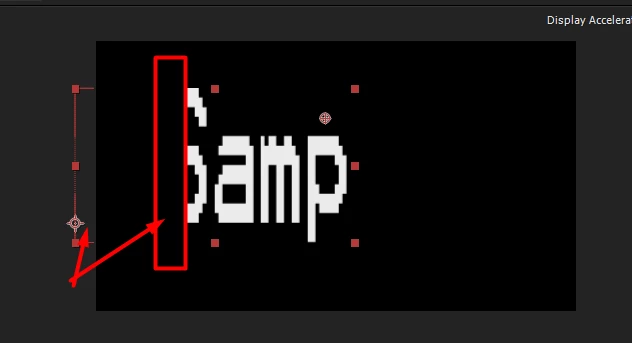
video url:

https://smart3.tinytake.com/sf/MzE1MTA1NF85NDQzNTE2

Regards,

Anthonie.

This topic has been closed for replies.

2 replies

Community Expert
December 11, 2018

and if all that fails, then during pre-render do a custom checkout of the

layer, with a corresponding checkout during smart render. (instead of

checking-in the input pixels)

that should return the full input size (post effects and masks, as opposed

to the old fashioned CHECKOUT_LAYER macro).

On Tue, Dec 11, 2018 at 9:11 AM shachar carmi <shachar.carmi@gmail.com>

Community Expert
December 11, 2018

after effects is trying to optimize the render flow, and crops inputs to an

increment of (i think) 10% of the visible image, so "out of comp" pixels

need not get processed.

i don't remember exactly how i worked around this issue in the past...

try:

1. setting preserve_rgb_of_zero_alpha during PreRender.

2. try declaring PF_OutFlag2_REVEALS_ZERO_ALPHA during global setup.

3. during PreRender, try declaring the requested rectangles as the layer

size.

On Tue, Dec 11, 2018 at 3:29 AM smarts19193560 <forums_noreply@adobe.com>