


Participant
October 17, 2026
Answered

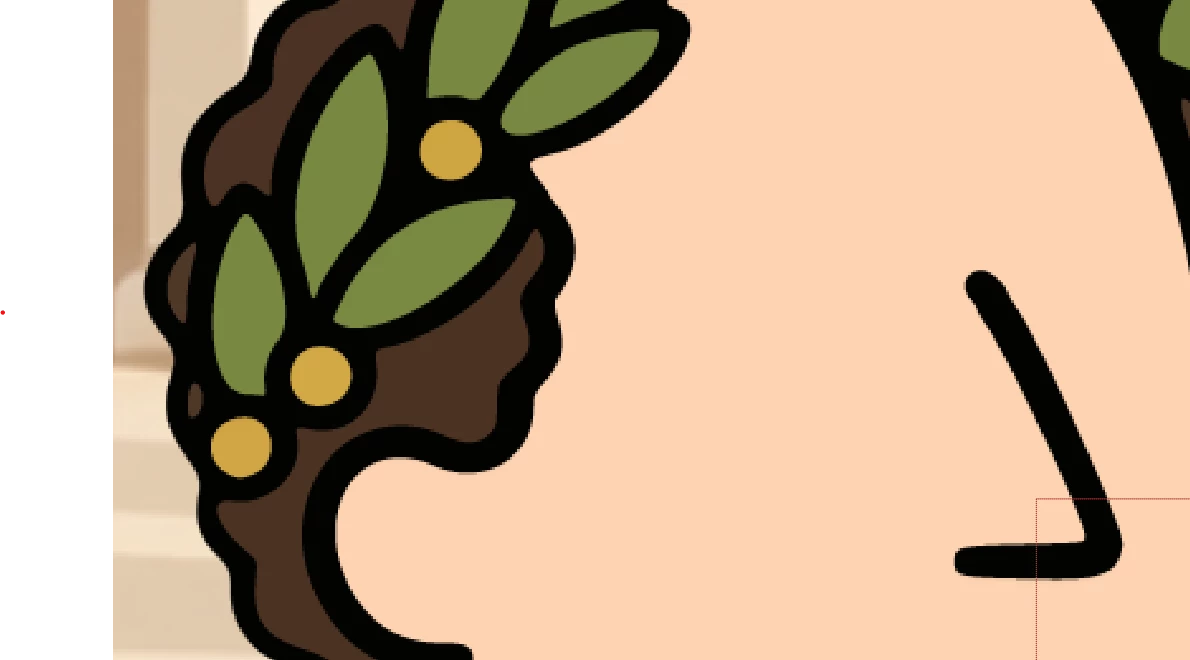
Jagged edges create shimmer or shining on character during wiggle movement

I have created a character in illustrator with size 800x1000. I add the file to AE with comp being at 4k. I enable continuous rasterization and also enable Create shape from Vector layer. When i apply wiggle effect on the character, it glitters and shines due to rough, jagged edges. I am zoomed to 250 percent in this image. You can see the jagged edges. Once I export out the video, it shines during wiggle and looks very bad. Please help

 

    CORCTON34033231
    CORCTON34033231Correct answer
    Community Expert
    October 18, 2026

    Hi! This is a classic scaling/aliasing issue rather than a problem with the wiggle itself:


    1. Your artwork is only 800x1000 px, but the comp is 4K, so the character is being scaled up about 4x. In Illustrator, scale the artwork up to the size it will have in the 4K comp (it's vector, so this is lossless) and re-import it, so the layer sits at or below 100% in After Effects.


    2. After using Create Shapes from Vector Layer, also switch on Continuously Rasterize for the new shape layer itself, and set the layer's Quality switch to Best. Then judge the edges at 100% zoom and Full resolution - at 250% zoom the preview always exaggerates them.


    3. If the thin black outlines still shimmer while moving, that's sub-pixel aliasing on high-contrast lines. A very small Fast Box Blur (around 0.5-1 px at 4K) on the character softens the edge contrast and usually calms the shimmer right down.


    Hope that helps!

    3 replies

    Participant
    October 19, 2026

    Hello, an update, I did a lot of testing and found that it was the damn VLC that was displaying that shimmer. Probably the settings need to be changed. I played the animation on another player(movies and TV player) and there was hardly an shimmer or glitter. 

    Having said that I really appreciate your guidance on character size and resolution. I will be switching to 1920x1080 as 4k will be an overkill. Thanks a lot again for the help!!

    Translate
    Participant
    October 19, 2026

    Thanks for taking the time to help me, appreciate it! I will test it out and let you know how it goes 


    Translate
    CORCTON34033231
    Community Expert
    CORCTON34033231Community ExpertCorrect answer
    Community Expert
    October 18, 2026

    Hi! This is a classic scaling/aliasing issue rather than a problem with the wiggle itself:


    1. Your artwork is only 800x1000 px, but the comp is 4K, so the character is being scaled up about 4x. In Illustrator, scale the artwork up to the size it will have in the 4K comp (it's vector, so this is lossless) and re-import it, so the layer sits at or below 100% in After Effects.


    2. After using Create Shapes from Vector Layer, also switch on Continuously Rasterize for the new shape layer itself, and set the layer's Quality switch to Best. Then judge the edges at 100% zoom and Full resolution - at 250% zoom the preview always exaggerates them.


    3. If the thin black outlines still shimmer while moving, that's sub-pixel aliasing on high-contrast lines. A very small Fast Box Blur (around 0.5-1 px at 4K) on the character softens the edge contrast and usually calms the shimmer right down.


    Hope that helps!

    Translate