
Inspiring
April 13, 2022
Answered

Keyboard shortcut doesn't work.

  • April 13, 2022
  • 1 reply
  • 462 views

Hi. I created a shortcut for “Reveal Layer Source in Project”. As you can see from the screenshot, it looks like AE accepted it.
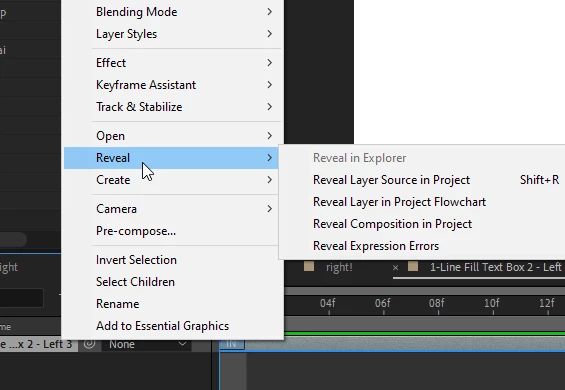


However, the shortcut doesn’t actually work. When I press Shift+R, nothing happens. Any suggestions?


Thanks!


This topic has been closed for replies.
Correct answer nishu_kush

Hi there,


Thanks for writing in.

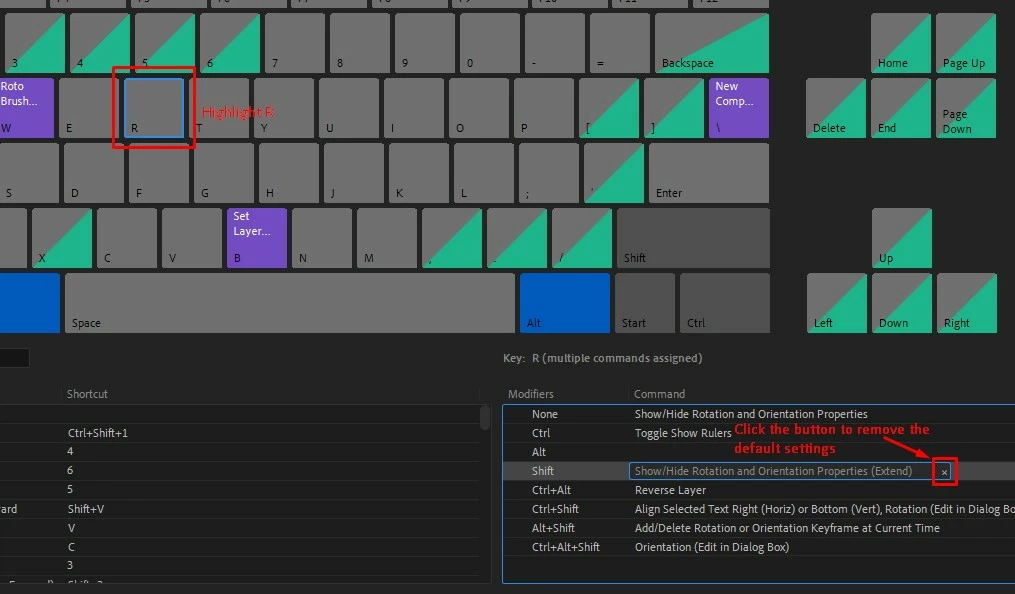
Shift+R is assigned to extend the rotation property of the layer. You can find another key combination that's free to use. If you want to assign Shift+R to Reveal Layer Source in Project, you may remove the default settings first. Check out the screenshot.

Let us know if it helps.


Thanks,

Nishu

1 reply

nishu_kush
Community Manager
nishu_kushCommunity ManagerCorrect answer
Community Manager
April 14, 2022

Hi there,


Thanks for writing in.

Shift+R is assigned to extend the rotation property of the layer. You can find another key combination that's free to use. If you want to assign Shift+R to Reveal Layer Source in Project, you may remove the default settings first. Check out the screenshot.

Let us know if it helps.


Thanks,

Nishu

Inspiring
April 14, 2022

Thank you. That worked!

So the fact that a shortcut combination is shown on a menu doesn't necessarily mean that it would work.