
nickn35634941
Inspiring
May 12, 2017
Answered

Keyframe equal tangent length - how to set and/or lock?

  • May 12, 2017
  • 2 replies
  • 1835 views

Hello, another basic question I can't seem to figure out.

Is it possible to set a keyframe to have equal tangent length? If so, how, and, is it possible to lock the tangent handle lengths?

Am I using the wrong terminology?

A google search returned no results for AE, and searching on this forum returned no results either..

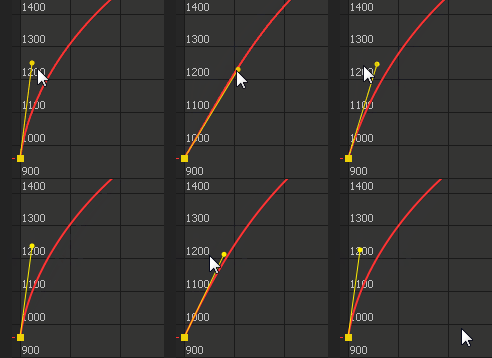
I thought while I am here I could also ask about another tangent handle issue which has been bugging me, why is it that I cannot move this handle all the way up to a vertical alignment? check this example of what I mean:
This topic has been closed for replies.
Correct answer Roei Tzoref

I now see what you mean.

is it possible to even control both handles equally/ simultaneously?

if they are the incoming and outgoing of the same keyframe - NO, if they are handles from different keyframes - YES, you can select them together and move them together.

It looks like you are able to set your handle vertically in that screenshot?

it takes more effort that you need to have in your screenshot. I think that although the visual result is different and the handle does not stretch straight, it can lead to the same result.

if you think there's some functionality missing here, please ask for in the feature request form and make Ae better for all of us. I haven't used C4D graph editor so I don't know if I am missing something: Feature Request/Bug Report Form

2 replies

Roei Tzoref
Legend
May 12, 2017
Is it possible to set a keyframe to have equal tangent length? If so, how, and, is it possible to lock the tangent handle lengths?

select both keyframes and use Ctrl+Shift+K (windows)

now you can set the influence, use lock dimensions to lock x and y.

there's a free script that can do it too: Dojo Ease Script: Easy Easing and Graph Edits in After Effects | CreativeDojo

why is it that I cannot move this handle all the way up to a vertical alignment?

I am not sure exactly what you mean or trying to accomplish. if a value influence handle was completely vertical, then the layer won't actually interpolate pixels. if moving from 0 to 100 value is vertical it means it's actually just 100...

nickn35634941
Inspiring
May 12, 2017

Hi Roei,

When I bring up the Keyframe Velocity panel (ctrl + shift + k) I don't get the option to lock the tangent, and from what I see on your screenshot that doesn't look like it would lock the tangent lengths either.

When I set the influence to be equal on incoming and outgoing, the handles still look like they are at different lengths.

Regardless, is it possible to even control both handles equally/ simultaneously?

As Mylenium said there is probably a script somewhere I can find, that dojo one looks like its just for easing rather than the features I was asking about.

Regarding vertical handle, it just sets the initial level of influence so I'm not sure what you mean.. It looks like you are able to set your handle vertically in that screenshot?

I thought it would be useful to show what I mean, to be more clear when I say tangent lengths being equal / locked:

Roei Tzoref
Roei TzorefCorrect answer
Legend
May 12, 2017

I now see what you mean.

is it possible to even control both handles equally/ simultaneously?

if they are the incoming and outgoing of the same keyframe - NO, if they are handles from different keyframes - YES, you can select them together and move them together.

It looks like you are able to set your handle vertically in that screenshot?

it takes more effort that you need to have in your screenshot. I think that although the visual result is different and the handle does not stretch straight, it can lead to the same result.

if you think there's some functionality missing here, please ask for in the feature request form and make Ae better for all of us. I haven't used C4D graph editor so I don't know if I am missing something: Feature Request/Bug Report Form

Mylenium
Legend
May 12, 2017

It's not possible natively. AE has the dumbest graph editor in the world. You can set it numerically with scripts, though. I believe there is such a tool on AEScripts.com in one of those "toolbox" script collections or even a separate script, you may just have to pay for it.

Mylenium

nickn35634941
Inspiring
May 12, 2017

Devastating..