
Participant
April 17, 2022
Answered

Keyframes

  • April 17, 2022
  • 2 replies
  • 314 views

Probably a really obvious thing but I've only just started using After Effects and need to know how to hold an object in place/extend the length of a keyframe before it starts moving again. I.e: in the picture below i need keyframe 2 to hold it's position until a second before keyframe 3

This topic has been closed for replies.
Correct answer Mohammad.Harb

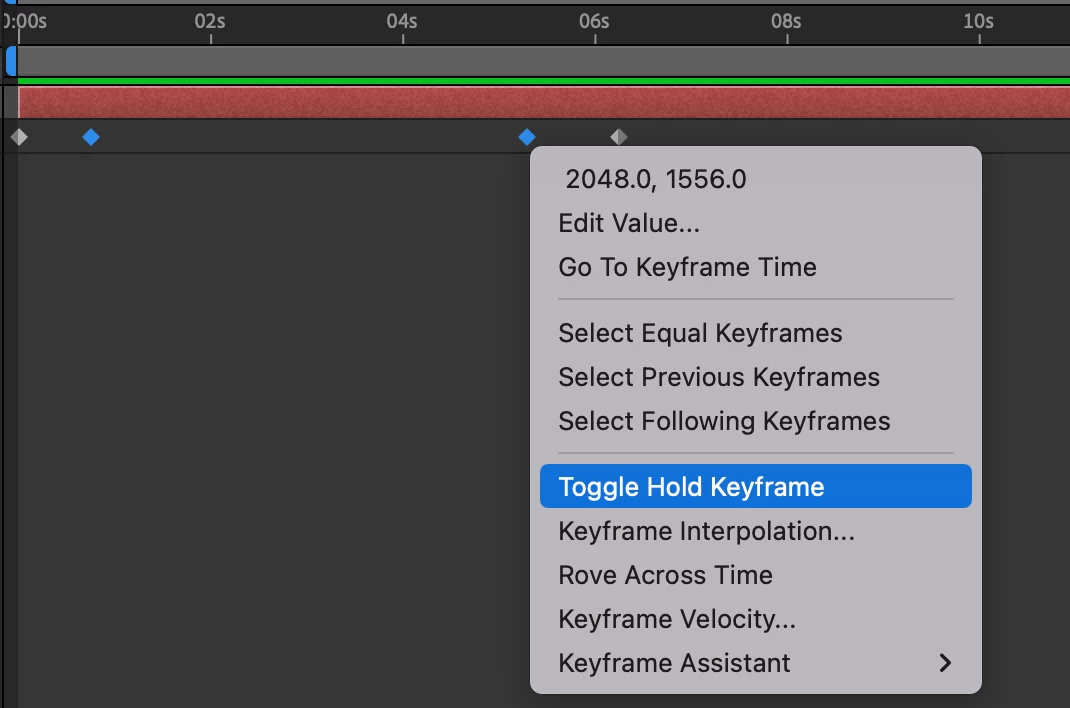
Copy the second keyframe and paste it before keyframe 3,  then right click on one the click: toggle hold keyframe as shown in the screenshot below

2 replies

Mohammad.Harb
Community Expert
Mohammad.HarbCommunity ExpertCorrect answer
Community Expert
April 17, 2022

Copy the second keyframe and paste it before keyframe 3,  then right click on one the click: toggle hold keyframe as shown in the screenshot below

Mylenium
Legend
April 17, 2022

You add more keyframes and tweak the interpolatiojn settings of the inbetween segements. I suggest you take the time to read the online help and watch a few tutorials on YouTube.


Mylenium