Participant
November 10, 2020
Answered

Layer controls size

  • November 10, 2020
  • 2 replies
  • 1031 views

Hi, 

I have a strange problem and I don't know how it happended..

The layer controls got very big somehow!

I searched all over the settings to find where I can set this things but didn't find any solution.

Its especialy difficult to work with smaal shape layers this way b/c I cannot see the layer throuth the big  controls...
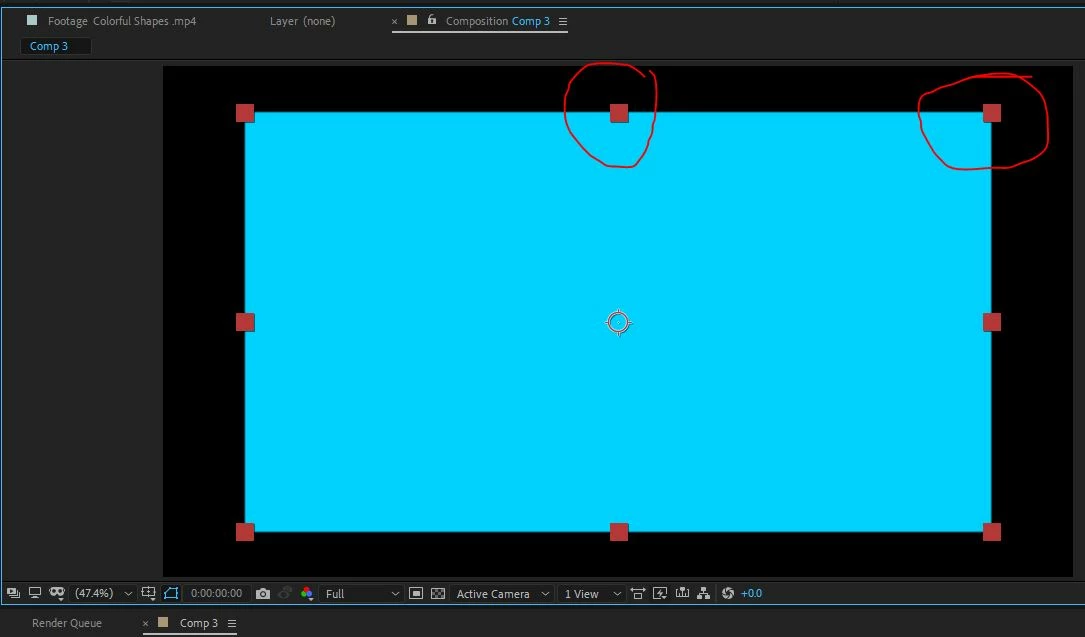
Did it happend to anybody out there?

Any idea how to fix it?

Thanks,

Ben

This topic has been closed for replies.
Correct answer Roland Kahlenberg

It's the first item in the Prefs>General.

2 replies

Roland Kahlenberg
Legend
November 10, 2020


There's a setting in AE's Prefs. See image below.


Very Advanced After Effects Training | Adaptive & Responsive Toolkits | Intelligent Design Assets (IDAs) | MoGraph Design System DEV
TrlvAuthor
Participant
November 10, 2020

I don't see any picture

Roland Kahlenberg
Roland KahlenbergCorrect answer
Legend
November 10, 2020

It's the first item in the Prefs>General.

Very Advanced After Effects Training | Adaptive & Responsive Toolkits | Intelligent Design Assets (IDAs) | MoGraph Design System DEV
nishu_kush
Legend
November 10, 2020

Hi Trlv,


That's not ideal.

Is it happening in all the projects? What's the exact version of After Effects you're using? Please try resetting the preferences. Here's how: https://community.adobe.com/t5/after-effects/faq-how-to-reset-trash-preferences-in-after-effects/td-p/10634342?page=1

Let us know if it helps.


Thanks,
Nishu

TrlvAuthor
Participant
November 10, 2020

Great! it worked!
It did happen in all projects, and I use CC 2019.
tried it also in CC 2020 and it was okay. But resetting the preferences worked!
Thanks a lot!