Participant
November 13, 2017
Answered

Layer error don't know how to fix please help

  • November 13, 2017
  • 1 reply
  • 500 views

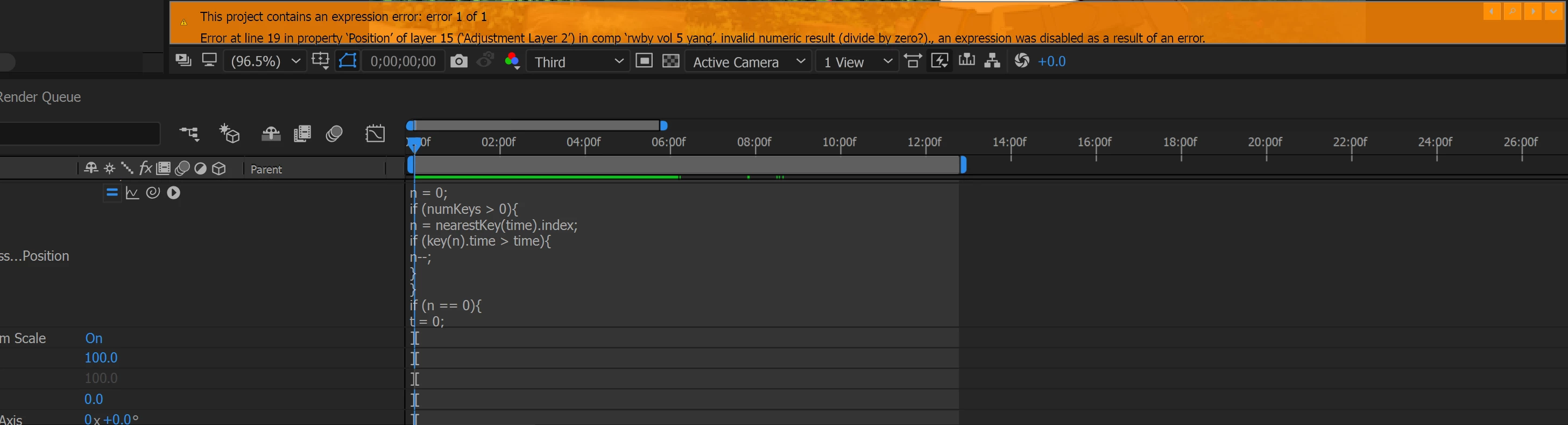
I don't know how fix this error, and just finished editing my video. please help
    This topic has been closed for replies.
    Correct answer Bluechris96

    If you copy the expression from layer 15 position and paste it into the forum we can take a look at line 19 and see what is going on. My guess is that the expression references some property in your comp that somehow gets to zero. For example, if you take the x position value of a layer and divide rotation when rotation gets to zero you will get a divide by zero error. For example:

    newVal = value[0]/rotation;

    [100, newVal]

    Any time the x position value gets to zero the expression will break. This may be why your comp stops rendering at 10 seconds.

    Post your expression and I'll take a look. It should be pretty easy to figure out where the error is coming from.


    Never minds guys I got it. I ended up rendering the video in "after effect media Encoder cc" everything came just thank for the help guys

    1 reply

    Roei Tzoref
    Legend
    November 13, 2017

    You got an expression error. Expression: A code that tells a property to do some calculations based on other property or value or math etc. by your question, I am guessing you did not write it yourself or aware to what it does. We need more information about your project. Full screenshots. Full expression error revealed. Press on the magnifying glass icon on the orange banner so it will lead you to the broken expression. What exactly is broke and not working anymore?

    Participant
    November 13, 2017

    I was making a video edit Don't know what's broken or how to fix it

    Roei Tzoref
    Legend
    November 13, 2017

    someone had to put this expression in there. is this a template? a project you got from someone else? what is this expression supposed to do? did you copy it and paste by yourself?

    you can click on the magnifying glass to lead you to the broken expression

    this will lead you to the broken expression.

    you can either fix the code or disable it by clicking on the equals sign

    or you could render the project as is and ignore the warning. if you don't know what it's doing or why it's there, I am guessing you won't tell if the result is any different.

    still "making a video edit" and using Ae with expressions are not related in terms of workflow. you are obviously not telling us the whole picture.
