
Participant
December 15, 2024
Answered

LAYER GETTING DISABLE ON RENDERING

  • December 15, 2024
  • 1 reply
  • 683 views

I converted one screen recording into 3d, changed its geometry curvature and animated it as you can see in the attached video.


But while rendering, this particular layer is getting disabled, and all other effects are working properly.


Can anyone help me with this? It is breaking my flow. I would be grateful if anyone could help resolve this asap.
This topic has been closed for replies.
Correct answer Airweb_AE

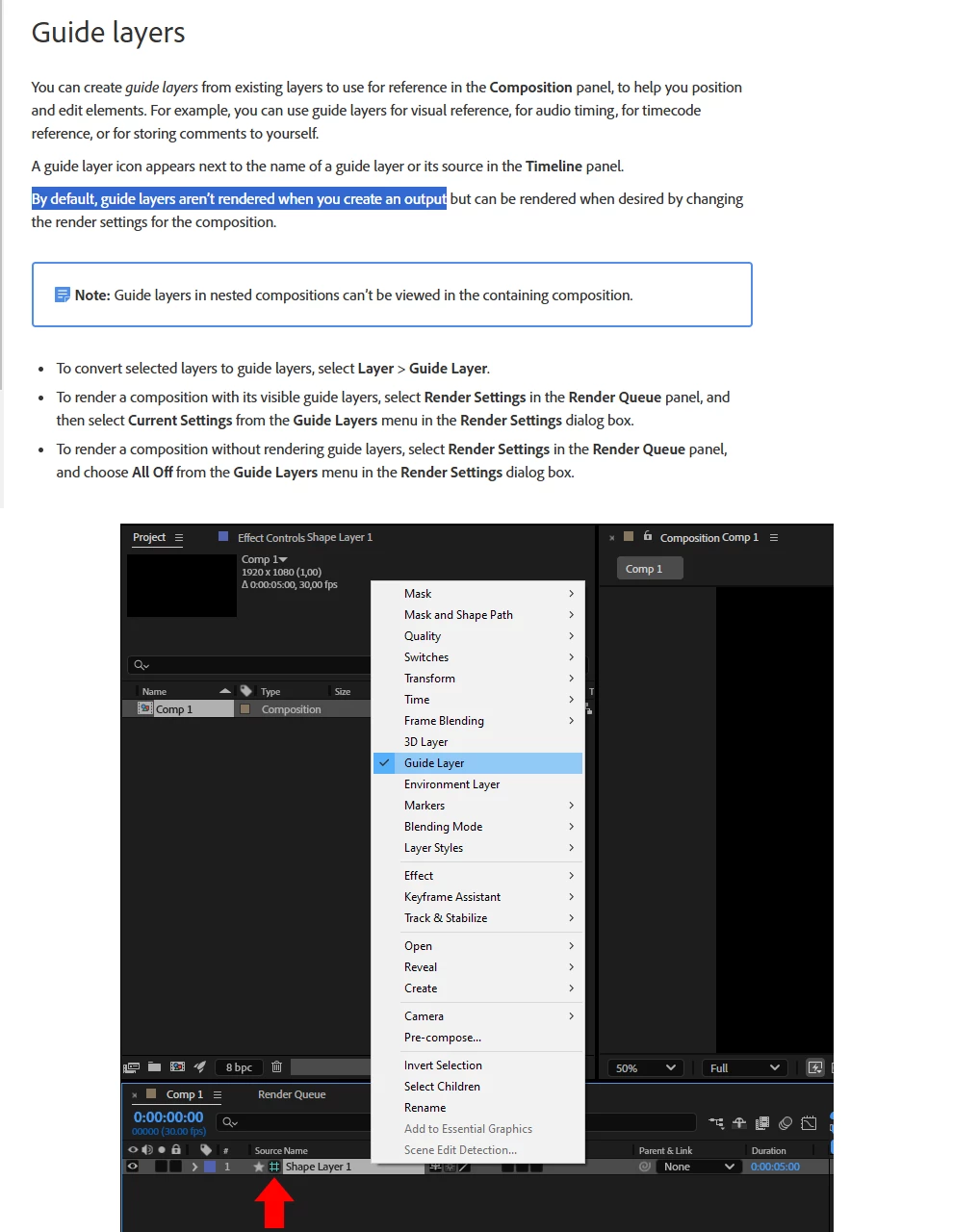
The screen recording layer you mentioned is set as a Guide Layer in After Effects.
Guide Layers are designed not to appear in the final render,
they are only visible in the Composition Panel for reference purposes.

To fix this, check if the layer is marked as a Guide Layer:

  1. Select the layer in the Timeline.
  2. Right-click on it and go to Guide Layer.
  3. If it's checked, uncheck it to disable the Guide Layer status.
    Once the Guide Layer is disabled, the layer should render properly.


1 reply

Airweb_AECorrect answer
Legend
December 16, 2024

The screen recording layer you mentioned is set as a Guide Layer in After Effects.
Guide Layers are designed not to appear in the final render,
they are only visible in the Composition Panel for reference purposes.

To fix this, check if the layer is marked as a Guide Layer:

  1. Select the layer in the Timeline.
  2. Right-click on it and go to Guide Layer.
  3. If it's checked, uncheck it to disable the Guide Layer status.
    Once the Guide Layer is disabled, the layer should render properly.


Participant
December 16, 2024

I gave hours to find the solution to this issue. Thanks for your kind help. The community was only the last option I tried, and you resolved it.