MahaB82A_
December 8, 2025
Answered

Layer in the timeline

  • December 8, 2025
  • 1 reply
  • 371 views

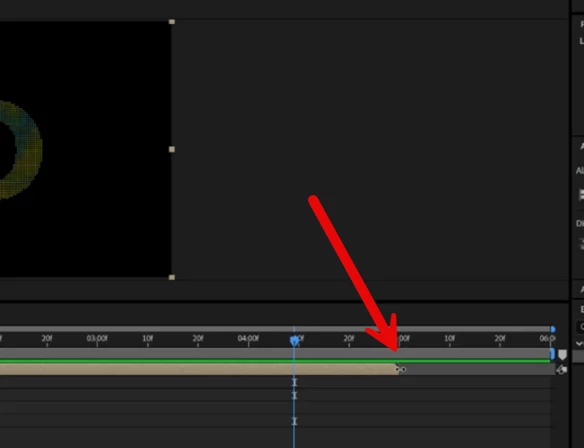
I want to extend this layer in the timeline. But it does not move after certain point. How to fix it? Video also uploaded.

 

2025-12-08_06-26-45.png 

Correct answer thepixelsmith

One addition to what @nishu_kush wrote.

You also have to extend every layer in the nested comp after you change the comp's duration.

If you nested comp includes other nested comps you need to repeat the entire process again on that nested comp as well.

1 reply

nishu_kush
Legend
December 8, 2025

Hi Maha,


Thanks for reaching out. Looks like you're trying to extend a Composition. You need to go inside the Comp by double-clicking and then go to Composition menu > Composition Settings > extend the duration as you like. Now you can extend the layer in your main comp.

Let me know if that helps.


Thanks,
Nishu

MahaB82A_
MahaB82A_Author
December 8, 2025

Thanks.

thepixelsmith
Community Expert
thepixelsmithCommunity ExpertCorrect answer
Community Expert
December 8, 2025

One addition to what @nishu_kush wrote.

You also have to extend every layer in the nested comp after you change the comp's duration.

If you nested comp includes other nested comps you need to repeat the entire process again on that nested comp as well.

Jerron Smith | www.thepixelsmith.com