Known Participant
May 18, 2023
Question

Layer order bug in AE 2023

  • May 18, 2023
  • 2 replies
  • 438 views

No idea why this is happening but layer order is not being respected in a simple precomp with basic vector shapes, compare inside precomp image to precomp in other comp: 
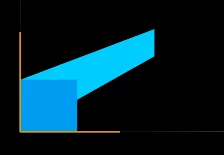
Was working 100% fine on one machine, jumped over to different Windows 10 machine with same version and getting this behavior. There is also a track matte pick whipped to revealing the light blue layer along x-axis but no 3D switches are enabled that would usually do this incorrect perspective error. All just flat 2D and not being displayed correctly outside a comp on one machin for some reason.

2 replies

Participant
September 29, 2025

Having same issue in 2025 version layer order not respected when no 3D layers are enabled, restarting computer seems to fix it but it's very strange and has happen to me a few times in different projects

Community Expert
May 18, 2023

We need to see the timeline with the modified properties of the problem layers showing. Press 'uu' and embed a screenshot of the main comp and pre-comp.


The most likely cause of the problem is that a matte or mask layer does not have Collapse Transformations turned on or ended up in the wrong comp. Trying to diagnose the problem from a couple of small screenshots of the image instead of seeing the structure of the project is like trying to drive to Selander Park using a photo of the swing set as a map.