
mrog73
Participant
August 18, 2019
Question

Layer outline visable on render

  • August 18, 2019
  • 4 replies
  • 692 views

Hi there,

I've searched the forums and haven't seen an answer to my specific issue.

I'm a new user, so thanks in advance for any help!

I'm using After Effects CC latest version.

I've created a layer which is a video that has the keylight effect, as well as position key frames.  I can see a partial outline of the layer, which I cannot get rid of, and shows up in an exported file as well.
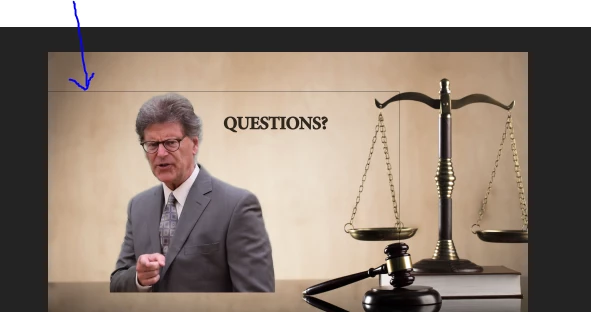
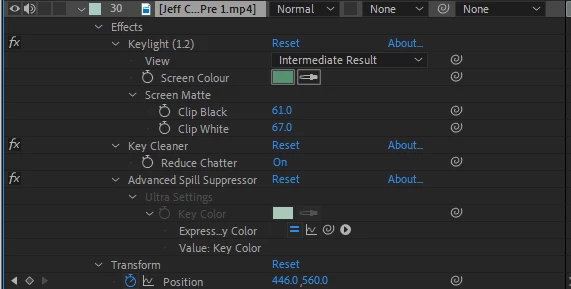
I've tried to change the mode to "alpha add" and that does not get rid of the lines.

Thanks!

Michael

This topic has been closed for replies.

4 replies

Warren Heaton
Community Expert
Community Expert
August 26, 2022

The screenshot of your Effect Controls shows the "View" option set to "Intermediate Result".  You change this to "Final Output" to evaluate your key and for rendering, correct?

You're still likely to have to draw a mask (or garbage matte) to resolve the issue with the line appearing.  I'm just double-checking that you're using the correct Keylight setting for output.


It also looks like you're using MP4 for the source footage to be keyed.  Ideally, this would be ProRes 422 or better from in-camera.

Community Expert
August 25, 2022

the line probably comes from a single pixel row and column of black pixels in the original footage. It is not usual for that to happen.


I seldom use Keylight without creating a Garbage Matte (mask) around the subject. 

Participant
August 25, 2022

I had this issue also and then I noticed that my layer had white stroke so i just set the stroke to the color of the background...

Roland Kahlenberg
Legend
August 19, 2019

Try scaling it up/down a little, in the Effect Controls Panel.

Very Advanced After Effects Training | Adaptive & Responsive Toolkits | Intelligent Design Assets (IDAs) | MoGraph Design System DEV
mrog73
mrog73Author
Participant
August 20, 2019

Scaling up and down did not remove the lines, but I did find a solution by drawing a mask around the actor.

Roland Kahlenberg
Legend
August 20, 2019

I'm glad you've manged to sort out the issue and thanks for reporting back.

Very Advanced After Effects Training | Adaptive & Responsive Toolkits | Intelligent Design Assets (IDAs) | MoGraph Design System DEV