Participant
April 10, 2019
Question

Layer's not appearing when Importing Photoshop File Into After Effects

  • April 10, 2019
  • 6 replies
  • 14411 views

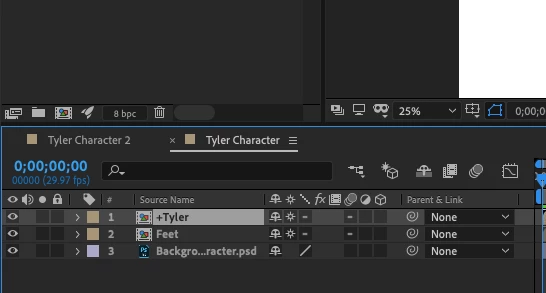
Hey! I have a character I rigged for animation I made in Photoshop, he has several layers to him. I go to import him into After Effects, via composition and it's coming up only as a flat composition! I have checked and it is RGB not CYMK and have been googling for hours and can't figure it out, please help, attached below are some photos to show what I'm talking about
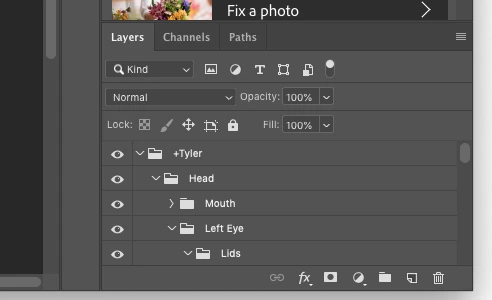
the characters photoshop layers

what I see when I import into After Effects

This topic has been closed for replies.

6 replies

keithh826401
Participant
July 1, 2021

The problem is most likely that your photoshop file was saved in CMYK mode instead of RGB. If you save in RGB you should have no problem importing the separate layers. 

Participant
February 3, 2022

This Worked For Me!!

Thanks!!!!!

Rameez_Khan
Legend
April 26, 2019

Hi tylerc,

There are some good suggestions above. Have you tried them yet?

Let us know.

Rameez

Warren Heaton
Community Expert
Community Expert
April 10, 2019

I don't think that this was mentioned yet:  Double-click on "+Tyler" and on "Feet" in AE to open the nested Comps.  Keep double-clicking to keep opening the nested Comps.  You'll eventually get to your layers. 

If you use the Tab key, AE will display the Mini-Flowchart view to allow you to quickly move between your downstream and upstream Comps.

If you're not quite ready for nested Comps, save a duplicate PS document and promote every layer to the root level of the document (such that you only have Layers and no Layer Sets / Layer Groups.  (Yes, this is going to make for a lot of layers that you'll need to scroll up and down through.)  Add a prefix to the the layer names to keep track of which body part the layer belongs to.  Save and import that into AE as a Comp.  You'll avoid nesting, but again the trade off is a lot of layers in one Comp.  From there, you'll be able to set up Parent/Child relationships.  You might want to create a Null as the parent for each group of layers that used to be in a Layer Set on the PS side.

Community Expert
April 10, 2019

The comp created in AE will have the first level PSD layers in the main comp that is created. You have put sublayers in your PSD file, head, then under that mouth, and so on. Each of those sublayers will be a new comp nested in the main comp. If you look at the flow chart you'll see the exact same structure. If you look at the folders created in the Project Panel you'll see everything.

You need to spend some time with the user guide and study up on preparing images for video. There is nothing wrong with AE. The only error I can see is that you have not prepared the PSD so that it will be easy to use in AE.

imeilfx
Inspiring
April 10, 2019

It is comming as a composition because that is how AE do things. In PS you have folders - in AE you have compositions. So all of your layers and other folders (comps) are inside of your main comp +Tyler. So justy double LMB on that composition and it should open it and there you will find (acording your screenshot form PS): compositios: Mouth, Left Eye etc. and inside of them rest of the layers or PS folders (in AE as comps).
So AE should and will (if everything was made and prepared in PS as it should) show your PS file in exactly the same structure as in PS but for PS folders you wil have AE compositions.

Abambo
Community Expert
Community Expert
April 10, 2019

Discussion successfully moved from Adobe Creative Cloud to After Effects

ABAMBO | Hard- and Software Engineer | Photographer