
Known Participant
June 25, 2021
Answered

Layers in timeline not showing properly in After Effects

  • June 25, 2021
  • 2 replies
  • 1622 views

Hi,

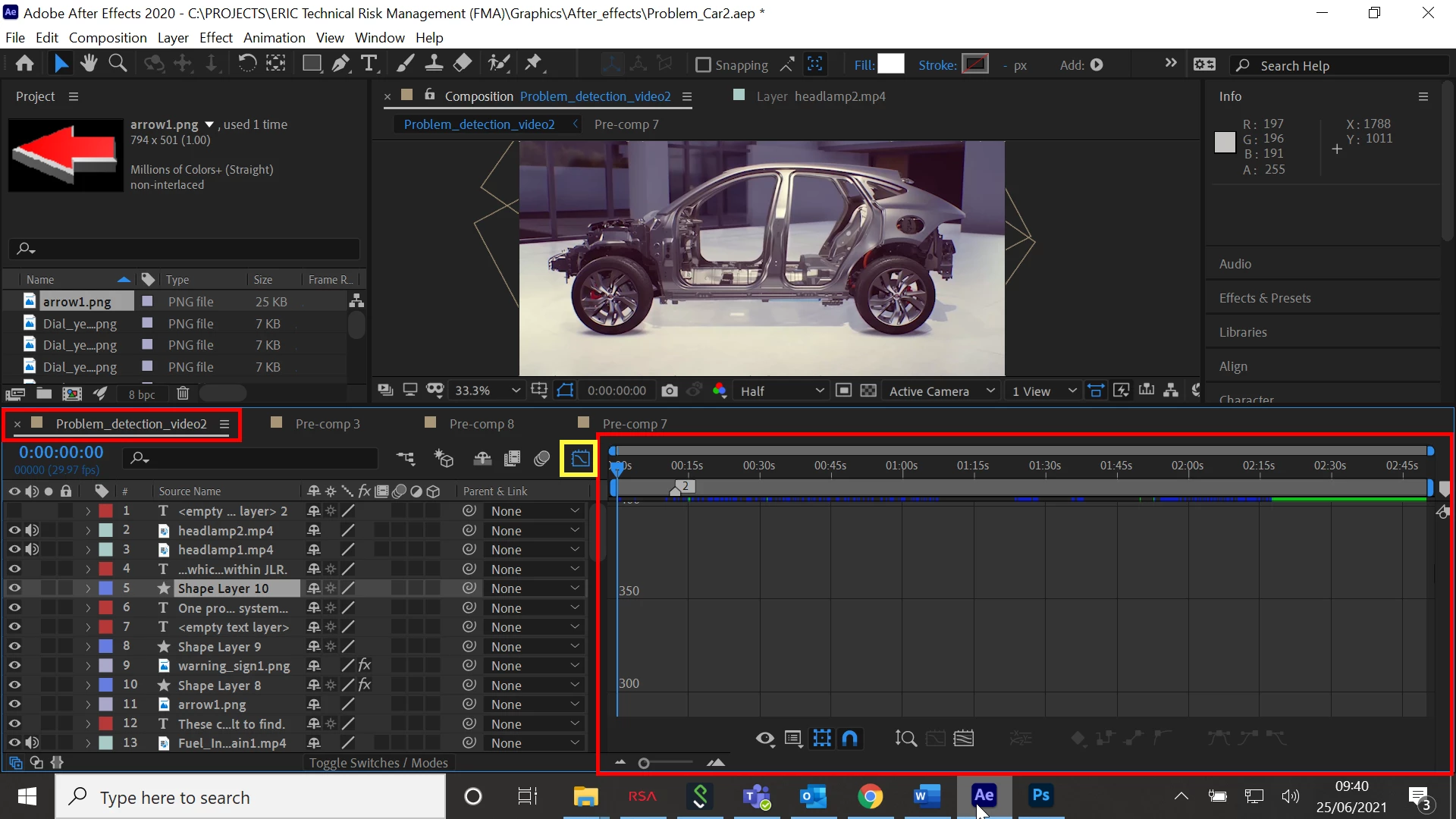
I have a problem with After Effects. If you look at the attached screenshot, in particular, the areas highlighted in RED, the layers are not showing properly in tyhe timeline. Now I don't know what I have done exactly, but can someone please tell me how to resolve this so that it displays normally?


Thanks in advance
This topic has been closed for replies.
Correct answer Ali Jaber

You pressed the Graph editor button by mistake, press it again:


2 replies

Ali JaberCommunity ExpertCorrect answer
Community Expert
June 25, 2021

You pressed the Graph editor button by mistake, press it again:


keith888Author
Known Participant
June 25, 2021

Hi,

Thanks very much for that!

That worked.


Keith

Mylenium
Legend
June 25, 2021

You have toggled the graph editor. You may want to read the online help on such basics, but for the time being toggling the farthest right button in the timeline info section or hitting Shift+F3 should do the trick.


Mylenium