
Participating Frequently
June 8, 2018
Answered

Left view missing - 2 View Horizontal

  • June 8, 2018
  • 2 replies
  • 3349 views

Hi,

I am using AE 15.1.1 (build 12) on a Windows 10 machine (specs at the bottom).

I've created a simple composition with just a camera layer (all default settings) and a text layer set as 3D.

When using the 2 Views - Horizontal layout, the right view is showing fine as Active Camera. The left view is completely blank (picture below). The parameters beneath the views do change when I click between the two views, but there is nothing on the left side: no blue corner triangles, no description of the camera view angle (Top), nothing.
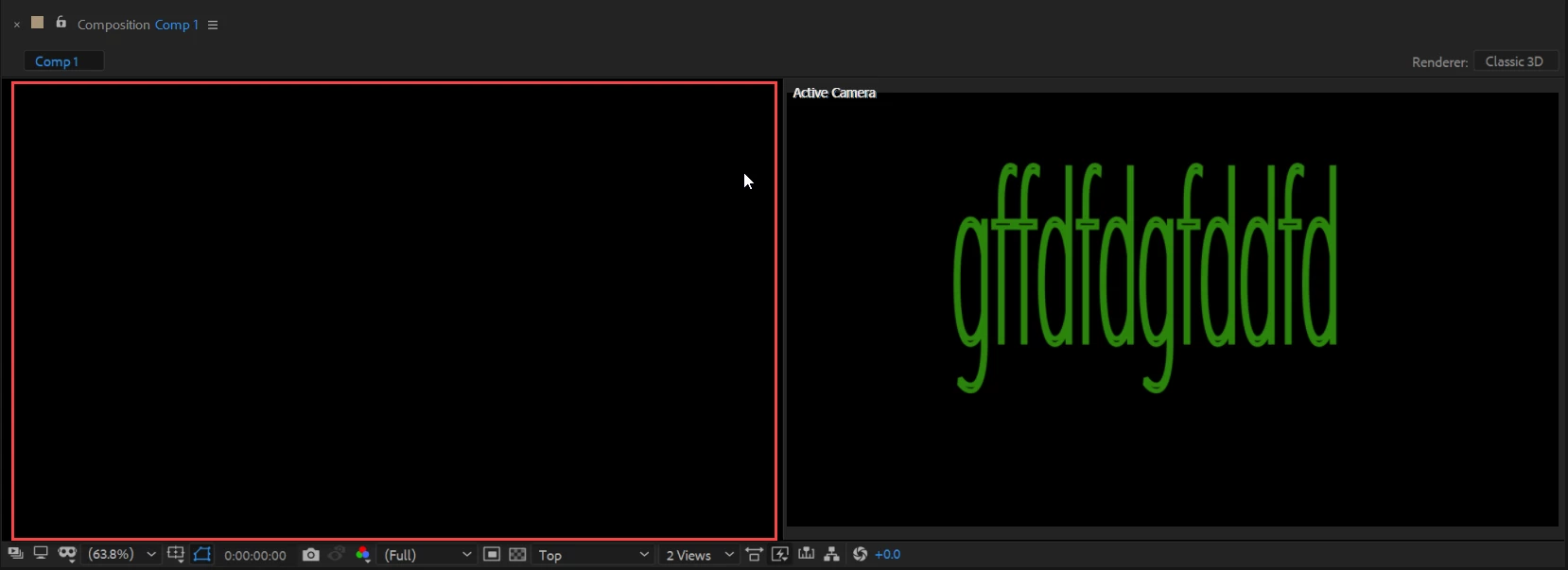
This has happened previously and restarting AE helped that time. It was working until I restarted AE again and now the left view is missing again. Restarting no longer helps, nor does recreating the composition from scratch or changing/resetting the workspace.

----

OS Name Microsoft Windows 10 Home

Version 10.0.16299 Build 16299

Other OS Description Not Available

OS Manufacturer Microsoft Corporation

System Name DESKTOP-4A6UDRV

System Manufacturer HP

System Model HP Notebook

System Type x64-based PC

System SKU Y5U79EA#ABH

Processor Intel(R) Core(TM) i7-7500U CPU @ 2.70GHz, 2901 Mhz, 2 Core(s), 4 Logical Processor(s)

BIOS Version/Date Insyde F.40, 11/1/2017

SMBIOS Version 2.8

Embedded Controller Version 62.47

BIOS Mode UEFI

BaseBoard Manufacturer HP

BaseBoard Model Not Available

BaseBoard Name Base Board

Platform Role Mobile

Secure Boot State On

PCR7 Configuration Elevation Required to View

Windows Directory C:\WINDOWS

System Directory C:\WINDOWS\system32

Boot Device \Device\HarddiskVolume1

Locale United States

Hardware Abstraction Layer Version = "10.0.16299.371"

Installed Physical Memory (RAM) 12.0 GB

Total Physical Memory 11.9 GB

Available Physical Memory 6.93 GB

Total Virtual Memory 20.9 GB

Available Virtual Memory 14.5 GB

Page File Space 9.00 GB

Page File C:\pagefile.sys

Device Encryption Support Elevation Required to View

Hyper-V - VM Monitor Mode Extensions Yes

Hyper-V - Second Level Address Translation Extensions Yes

Hyper-V - Virtualisation Enabled in Firmware No

Hyper-V - Data Execution Protection Yes

    Correct answer Emma22798947e3gc

    I know this is old, but I just had the same issue. 

    When I clicked the 3d Renderer tab in Composition Settings and looked at the dropdown Renderer menu it just reset on its own. No idea how or why. I didn't even actually select or change anything. Try that or click the options button in the same Comp Settings and see if that works for future issues. I'd personally love to know if that actually works on others or if it was just a coincidence.

    2 replies

    Emma22798947e3gcCorrect answer
    Participant
    February 16, 2025

    I know this is old, but I just had the same issue. 

    When I clicked the 3d Renderer tab in Composition Settings and looked at the dropdown Renderer menu it just reset on its own. No idea how or why. I didn't even actually select or change anything. Try that or click the options button in the same Comp Settings and see if that works for future issues. I'd personally love to know if that actually works on others or if it was just a coincidence.

    Participant
    April 23, 2025

    Worked on me, Thank you

    Szalam
    Community Expert
    Community Expert
    June 8, 2018

    If you click on the left view and toggle transparency, what happens?
    What, exact, version number of AE are you running?

    Participating Frequently
    June 8, 2018

    Toggling transparency does nothing.

    It's AE 15.1.1 (build 12)

    Community Expert
    June 8, 2018

    Your cropped screenshots are not very helpful. We don't see the modified properties of your layers and we don't know what view options you have turned on. Your left comp panel is set to Top view so without the Camera Wireframe turned on and no layers selected your top view may indeed be empty.

    First, reset your workspace. Next, select all layers and press the U key twice to reveal all modified properties, then reset everything on the camera and the text layer. Then select the camera or the text layer and you should see either the wireframe for the camera of the handles for the text layer in the Top view and there should be triangular selected view markers in each corner of the selected view.

    If you don't the 4 selected view markers in the corners of the selected view and the Top and Active Camera then either the preferences are fouled up or you have a display driver issue. Let us know what you see. I have not heard of any bugs that could be causing you problems as long as you have the latest build of your version of AE installed.