


Levels Effect not showing anything in Histogram
Greetings, I'm not much experienced so far in AfterEffects, nevertheless, I'm facing an issue, which I'm unable to solve.
I'm trying to create a realistic water flow. I already created the animation and paths, but when I came across the texture, I was unsuccessful in doing it. I'm halfly following this tutorial => https://youtu.be/GLwpCNil3XE?si=D70xb_fRAtc3wta3&t=1181 ... the differences, which I'm doing. 1. The water is on an object, so I'm not using CC Glass effect and 2. I created specific paths with the pen tool and then animation by Taper and Trim paths.
I found out two problems:
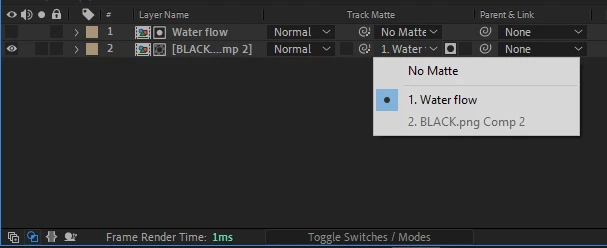
1. When I click on the TrackMatte setting on the BackGround layer. I only see "No Matte" and the two layers, while there should be Four options + No Matte (Alpha Matte / Inverted, Luma Matte / Inverted). If I choose the Water flow layer. The result looks similar to the tutorial, so I'm not sure if it is a problem.
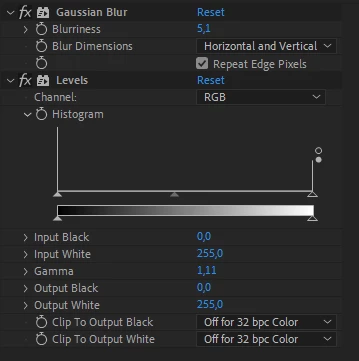
2. When I add Levels Effect on the Water flow layer. I got nothing in the Histogram and if I try to move any of the settings, it changes nothing, which is stopping me in creating the texture.
I suppose it's because of some settings, but I don't know. If someone will be able to help me, I'll be grateful
I'm on Windows btw
Tygnar
.
 AdChoices