Participant
April 23, 2018
Question

Light tunnel distortion

  • April 23, 2018
  • 2 replies
  • 1247 views

Hi,

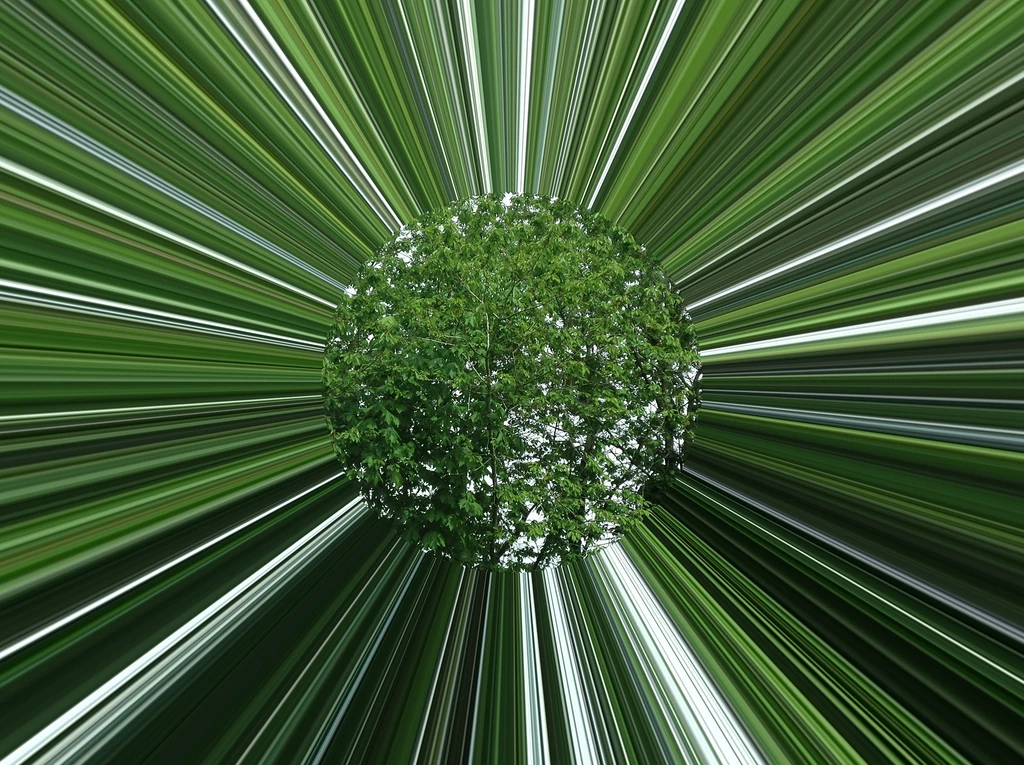
I'm trying to find a way to achieve a light tunnel distortion in either After Effects or Premiere that would allow me to animate diameter of the non-distorted area, similar to the Light Tunnel effect in Apple Photo Booth App (screenshot attached). Any suggestions?

Thanks a lot!
    This topic has been closed for replies.

    2 replies

    angie_taylor
    Legend
    April 24, 2018

    Duplicate the layer. Add the Reshape effect to the new layer. Create one mask the shape you want to stay static, duplicate this mask and then extend it beyond the edges of your comp using free transform.

    In the Reshape effect, drag the slider to reshape the pixels from one shape to the other. You can mask this layer to reveal the original beneath.

    Another option could be to create a masked version of your image with two circles so that it’s basically a ring of 1 pixel thick. Then precompose it and animate it sCaking. Then precompose this and apply the Echo filter to it, choosing above ( or below) as The comp method. Adjust the echo time to suit.

    need to check these as not in front of AE right now but they should work.

    Mylenium
    Legend
    April 24, 2018

    AE doesn't have an identical built-in effect, but you could easily create it using a duplicate of your layer, some contrast adjustments and using one of the radial blur effects followed by masking out thge center.

    Mylenium