MahaB82A
January 15, 2022
Answered

Line attached to keyframe

  • January 15, 2022
  • 2 replies
  • 589 views

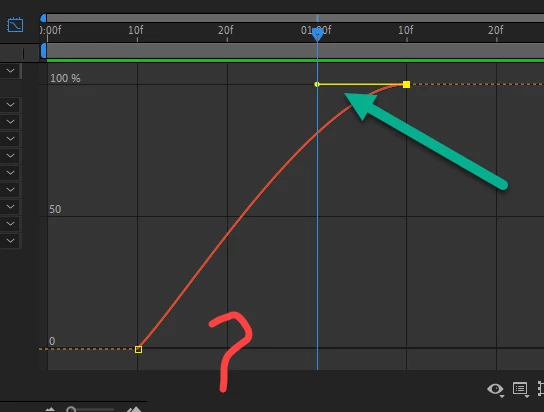
Why is line attached to keyframe missing at the bottom?
 

This topic has been closed for replies.
Correct answer Warren Heaton

Since the current Keyframe Interpolation of the 1st keyframe is Temporal: Linear, there's no tanget to show. 


By pressing F9 (as mentioned in the prior post) while that keyframe is selected, you tell After Effects to apply Animation > Keyframe Assistant > Ease Ease.  This changes the Keyframe Interpolation of the 1st keyframe from the Temporal: Linear default to Temporal: Bezier and as such there's a tangent to show.


Keyframe interpolation in After Effects (adobe.com)


2 replies

Warren Heaton
Community Expert
Warren HeatonCommunity ExpertCorrect answer
Community Expert
January 15, 2022

Since the current Keyframe Interpolation of the 1st keyframe is Temporal: Linear, there's no tanget to show. 


By pressing F9 (as mentioned in the prior post) while that keyframe is selected, you tell After Effects to apply Animation > Keyframe Assistant > Ease Ease.  This changes the Keyframe Interpolation of the 1st keyframe from the Temporal: Linear default to Temporal: Bezier and as such there's a tangent to show.


Keyframe interpolation in After Effects (adobe.com)


MahaB82A
MahaB82AAuthor
January 15, 2022

Thanks for exolanation and link

Mrtn Ritter
Participating Frequently
January 15, 2022

The tangent is missing, because this keyframe is not eased. Mark the keyframe, press F9 to apply easyease and you are good to go.


*Martin

MahaB82A
MahaB82AAuthor
January 15, 2022

Thank you very much for help.
