
Participating Frequently
December 13, 2022
Answered

Link a single keyframe to point control expression in After Effects

  • December 13, 2022
  • 3 replies
  • 977 views

I want to adjust the value of a single keyframe by changing the values in a point controller. 

The expression that I came up with doesn't quite work because it changes to values of all the keyframes of that layer. 


transform.position.key(4).value = effect("Point Control")("Point")
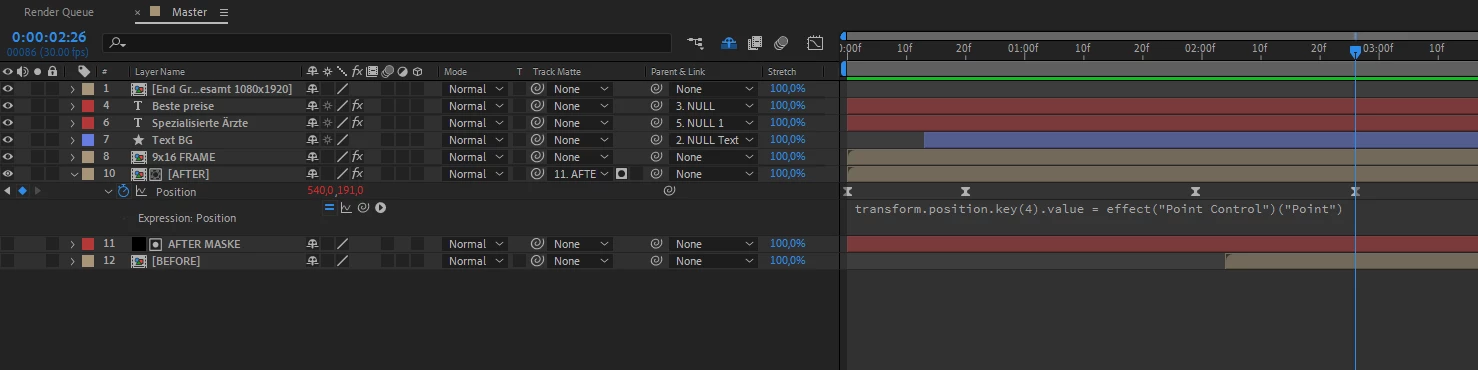
 

I tried to find a solution but I can't wrap my head around this problem.

This topic has been closed for replies.
Correct answer Dan Ebberts

This might work for you:

p = toComp(effect("Point Control")("Point"));
v3 = key(3).value;
t3 = key(3).time;
v4 = key(4).value;
if (time >= t3){
  x = linear(value[0],v3[0],v4[0],v3[0],p[0]);
  y = linear(value[1],v3[1],v4[1],v3[1],p[1]);
  [x,y]
}else
  value

3 replies

Mylenium
Legend
December 14, 2022

Toggle the graph editor and the icon for the expression graph to see if it does anything at all. Just staring at your code I can't see why this isn't working. It really should. Perhaps it just acts weird because the layer is trimmed or the layers above cover up the layer even though the expression correctly does its thing.


Mylenium

Marc.tAuthor
Participating Frequently
December 14, 2022

I tried to a new layer with just to keyframes on top of all the other layers, still the same problem. Even when I add 4 keyframes to the layer it makes the 3rd keyframe some kind of hold keyframe.


First I am playing the animation without the expression applied, second time with the expression enabled. It should change the values of the 4th keyframe but it doesn't.


Is this some kind of bug inside of After Effects?

Dan Ebberts
Community Expert
Dan EbbertsCommunity ExpertCorrect answer
Community Expert
December 13, 2022

This might work for you:

p = toComp(effect("Point Control")("Point"));
v3 = key(3).value;
t3 = key(3).time;
v4 = key(4).value;
if (time >= t3){
  x = linear(value[0],v3[0],v4[0],v3[0],p[0]);
  y = linear(value[1],v3[1],v4[1],v3[1],p[1]);
  [x,y]
}else
  value
Marc.tAuthor
Participating Frequently
December 14, 2022

This worked perfectly. Thank you so much!

Mylenium
Legend
December 13, 2022

You cannot link keyframes directly. That's where functions like


valueAtTime(key(4).time)


would come into play. But even that apparently would require to interpolate from the previous keyframe in some form, so it's really not quite clear what you are even trying to do here. You need to explain in more detail what you are actually trying to achieve. Chnaces are it doesn't even require expressions, just layered animation by ways of using a Null and parenting.


Mylenium