Natalie_42
Participant
February 14, 2023
Answered

Link mask path form nested composition
  • February 14, 2023
  • 3 replies
  • 1312 views

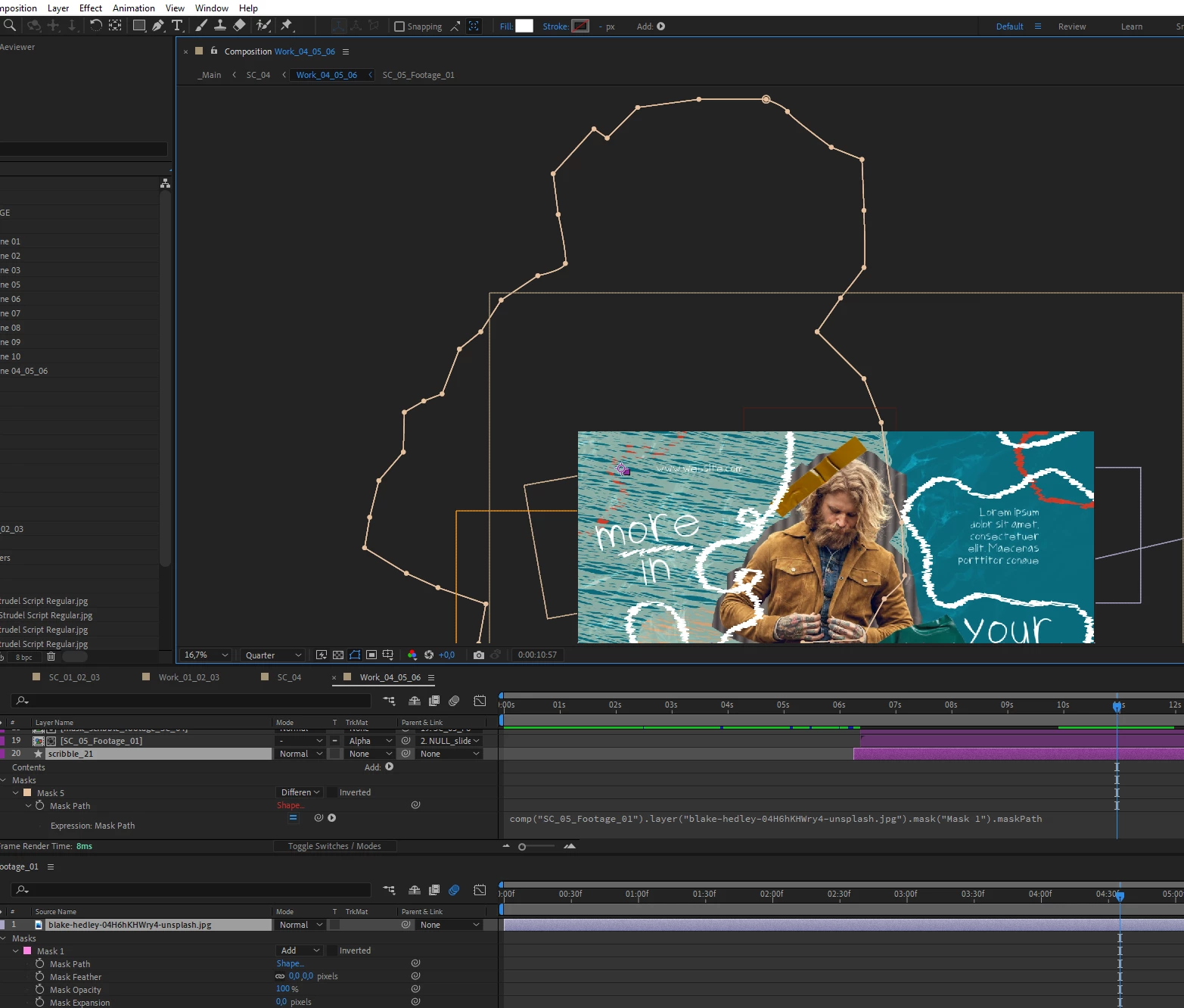
I link mask Path from nested composition. And the new mask becomes larger than the parent one. How I fix the size mask without scaling layer?

This topic has been closed for replies.
Correct answer Dan Ebberts

So I ran a little test that seems to work well. You set L1 to the layer in the precomp with the mask you want to copy and you set L2 to the precomp layer in the main comp. In the main comp you would create a shape layer by clicking anywhere with the pen tool and paste this in for the shape path:


L1 = comp("zipper 1").layer("zipper 1.avi");
L2 = thisComp.layer("zipper 1");
path = L1.mask("Mask 1").maskPath;
p = path.points();
it = path.inTangents();
ot =  path.outTangents();
pNew = [];
itNew = [];
otNew = [];
for ( i = 0; i < p.length; i++){
  pNew[i] = fromComp(L2.toComp(L1.toComp(p[i])));
  if (it.length > 0){
    temp = fromComp(L2.toComp(L1.toComp(p[i] + it[i])));
    itNew[i] = temp - pNew[i];
  }
  if (ot.length > 0){
    temp = fromComp(L2.toComp(L1.toComp(p[i] + ot[i])));
    otNew[i] = temp - pNew[i];
  }
}
createPath(pNew,itNew,otNew,path.isClosed())


3 replies

Community Expert
February 14, 2023

Paths are based on layer size, not comp dimensions. If you scale, move, or rotate a layer, a linked or copied path, the position of the new path will not match. 

Dan Ebberts
Community Expert
Community Expert
February 14, 2023

You might be able to do something by harvesting the points from the mask path and using createPath() to create a scaled version. What is that you're trying to do exactly?

Dan Ebberts
Community Expert
Dan EbbertsCommunity ExpertCorrect answer
Community Expert
February 14, 2023

So I ran a little test that seems to work well. You set L1 to the layer in the precomp with the mask you want to copy and you set L2 to the precomp layer in the main comp. In the main comp you would create a shape layer by clicking anywhere with the pen tool and paste this in for the shape path:


L1 = comp("zipper 1").layer("zipper 1.avi");
L2 = thisComp.layer("zipper 1");
path = L1.mask("Mask 1").maskPath;
p = path.points();
it = path.inTangents();
ot =  path.outTangents();
pNew = [];
itNew = [];
otNew = [];
for ( i = 0; i < p.length; i++){
  pNew[i] = fromComp(L2.toComp(L1.toComp(p[i])));
  if (it.length > 0){
    temp = fromComp(L2.toComp(L1.toComp(p[i] + it[i])));
    itNew[i] = temp - pNew[i];
  }
  if (ot.length > 0){
    temp = fromComp(L2.toComp(L1.toComp(p[i] + ot[i])));
    otNew[i] = temp - pNew[i];
  }
}
createPath(pNew,itNew,otNew,path.isClosed())


Natalie_42
Participant
February 15, 2023

Thanks for the answer, but I couldn't repeat it in my project:

Mylenium
Legend
February 14, 2023

You basically can't. Linking masks directly really simply copies the structure one on one. If you need to manipulate the mask, you will have to come up with another method and/ or restructure your project. For your scribble effects it would probably make sense to create them all in separate comps at a consistent scale and overly the pre-comps rather than trying to apply them directly.


Mylenium