
Live Text Templates not behaving as expected
The new Live Text Templates upgrade PPRO 2017.1 & AE 2017.2 -- Not behaving as expected.
As I understand it, these are the new features:
- Live Text Templates access new more robust functionality in AE via the "Essential Graphics" panel that allows you not only to choose which text layers will pass to PPro for Editor control but also an array of other properties. It's a brilliant idea: Allow PPro control over text content and a minimum number of AE properties, hide the rest and leave it to the AE designer.
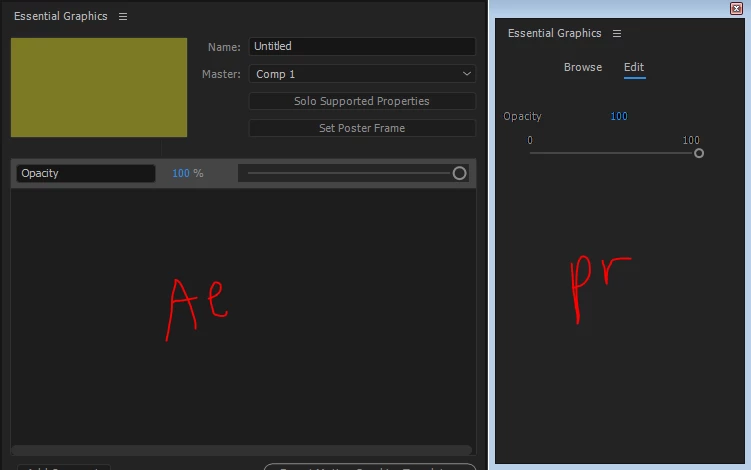
Problem is: doesn't seem to be working. After building the template, and attempting to drag the various properties to "Essential Graphics" the following didn't seem to work properly:
A - On the AE side the only properties that could be dragged to "Essential Graphics" were Text and Opacity.
B - In spite of dragging only one text layer to Essential Graphics, all the AE text layers appear on the PPro side. I thought the point was to have control over which layers are available to the editor.
C - In spite of dragging the Opacity property to Essential Graphics panel on the AE side, it isn't available on the PPro side.
Am I missing something?
 AdChoices