Known Participant
September 18, 2019
Question

loopOut only loop once

  • September 18, 2019
  • 2 replies
  • 3178 views

Hello ,


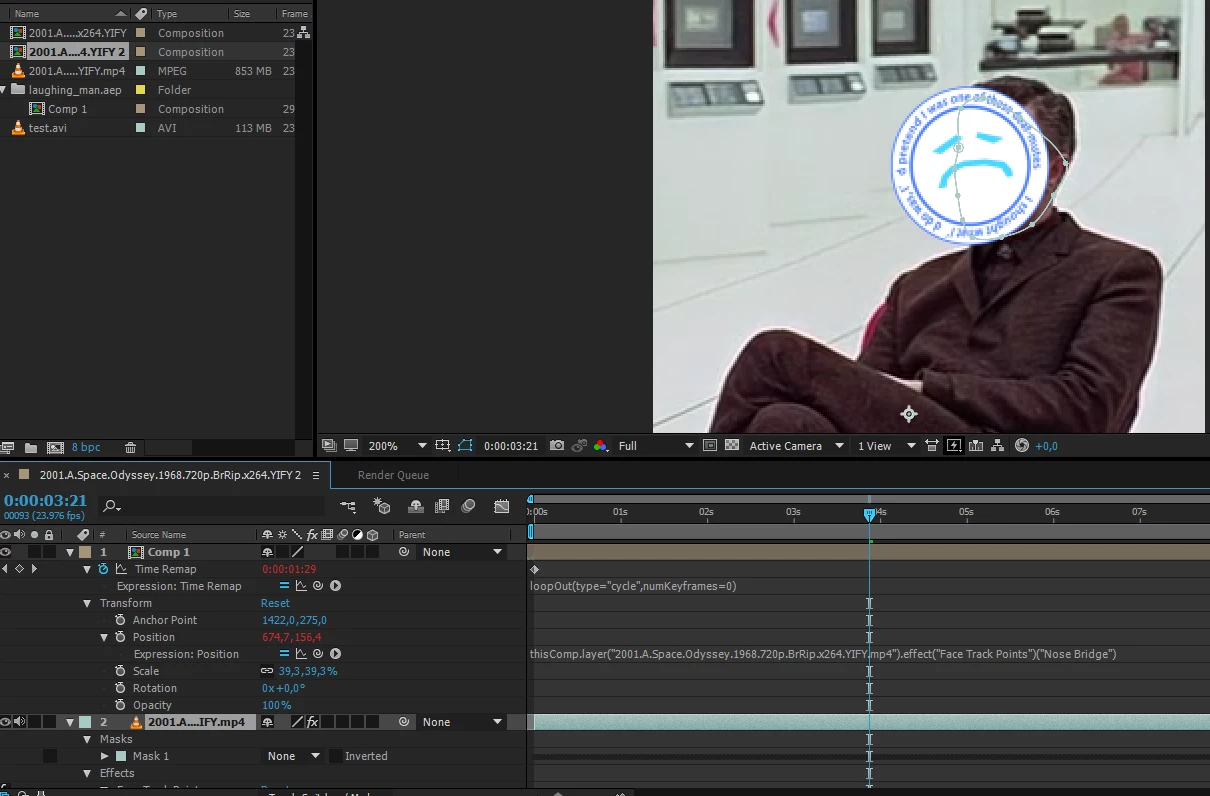
I try to make an imported composition (6s) loop on the main composition (+-16s)

I used time remap/loopOut, it works fine except it only does the loop once...it stops at 12s


howa can that be ?

thanks
 

    This topic has been closed for replies.

    2 replies

    Warren Heaton
    Community Expert
    Community Expert
    September 19, 2019

    Enabling Time Remapping should have placed a second keyframe one frame after the last frame of your nested Comp.  It seems to be missing.


    It's the range of keyframes that gets looped, so you'd need a Time Remapping keyframe at the head of the comp and one a the tail.


    Known Participant
    September 19, 2019

    from the tutorials, the second key has to be placed at the end

    Community Expert
    September 18, 2019

    I see two keyframes, barely, in your screenshot and it looks like they are at the start and end of the comp. If you want six loops then you need to extend the length of the layer beyond the last Time Remapping keyframe. 


    If you just enabled time remapping and then added loopOut() to the property, there is no need for all the other code because "cycle" is the default, then you are going to end up with an empty frame. Here's the workflow for time remapping an animation.

    1. Set up your animation to complete in a certain amount of time
    2. If you want a seamless animation make sure that the first and last frame of the animation is identical
    3. Trim the layer to one frame before the animation starts over - if the first and last frame are identical then just back up one frame and trim the layer or layers
    4. If you are going to pre-compose then choose trim comp to layer length.  If you are going to nest the comp in another comp trim the comp length to the end of the layer
    5. Apply Time remapping to the nested comp (pre-comp) using the shortcut or the menu. This will set two keyframes and extend the length of the nested comp to the length of the new comp
    6. Use the k key to jump to the last frame of Time Remapping - there should be nothing visible from the nested comp
    7. Use Ctrl/Cmnd + left arrow to move back one frame and set a new keyframe using the new keyframe tool - the last frame of the animation is now visible
    8. Hold Alt/Option and Click on the Time Remapping stopwatch to start an expression
    9. Enter loopOut() to cycle the loop forever

    That's all there is to it but if you don't follow those steps you won't get a loop that lasts as long as the layer.

    Known Participant
    September 18, 2019

    I updated the screenshot, I use loopOut(type="cycle",numKeyframes=0)

    Community Expert
    September 18, 2019
    Now I only see one keyframe. I suspect that you did not trim the pre-comp to the length of the animation and that you did not set a new keyframe and delete the original last keyframe.
