Participant
Apr 29, 2024 12:14 PM UTC
Question

Low memory warning after effects 2024 & 2023

After effects only preview my project around 5 frames. I have tried to open the project using after effects version 24.3, 24.1, 23.0 yet it still didn't work. I also have tried to remove some layers which used 3rd party plugin but that didn't solve the problem, even when i imported mp4 file only without any effect on it, it still previewing only around 5 frames. But this problem didn't disrupt the image files in the project.


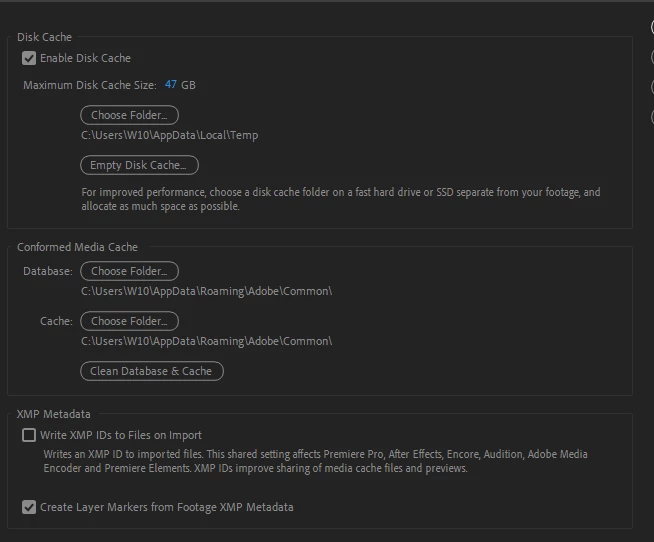
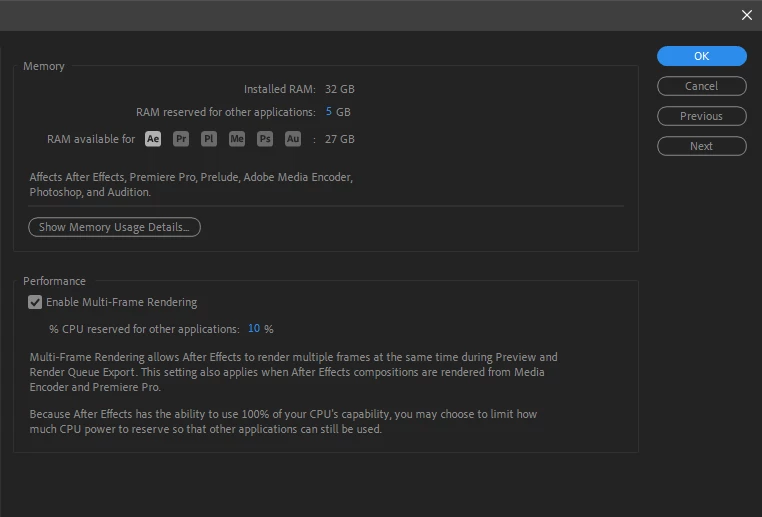
I have tried to set the ram for after effect for 27gb and empty the disk cache but it didn't solve the problem either.

When i re-opened the software, it runs normally but only for a while, after around 2-3 times previewing the video, the problem came back


My PC specs:
- Ryzen 1500x
- Ram 32gb

- RTX3060
This topic is closed to new replies. Start a new post to keep the conversation going.

7 replies

nishu_kush
Legend
Jun 6, 2024 6:22 PM UTC

Did the suggestion above help?

Feel free to reach out. Moving this thread from Bugs to Discussions for now.


Thanks,

Nishu

Translate
Apr 30, 2024 3:04 AM UTC

The log file indicates the plugin "Deep Glow" is causing the issues while rendering. Can you try disabling that effect (Effect Menu => Manage Effects... => Check the Deep Glow checkbox off, restart AE) and see if that helps with your issue?

Translate
Participant
Apr 30, 2024 1:18 AM UTC
Participant
Apr 30, 2024 12:06 AM UTC

Sorry it's my first time, but where can i get the crash log? Because when i'm previewing the project, it suddenly closed without any warning or pop out window

Translate
Apr 29, 2024 11:11 PM UTC

Any chance you got a Report the Crash dialog and submitted that? 

Translate
Participant
Apr 29, 2024 10:57 PM UTC

I tried the beta version, it took a while for the preview and then crashed

Translate
Apr 29, 2024 4:38 PM UTC

Can you try the AE Beta (available in CCD) and see if this is still an issue for you? 

Translate