


Participant
Feb 28, 2020 10:57 AM UTC
Answered

Magnify effect double vision

Hi,

I'm new to after effects so I need a little troubleshooting help.


I am trying to create a magnifying glass type effect over some type. 

I've followed some online tutorials and have added an adjustment layer using magnify and bulge effects and have them tracking the magnifying glass movement all good so far.


The issue is the magnify effect seems to be duplicating the text and enlarging to over the top of the original text (double vision see attached image). 
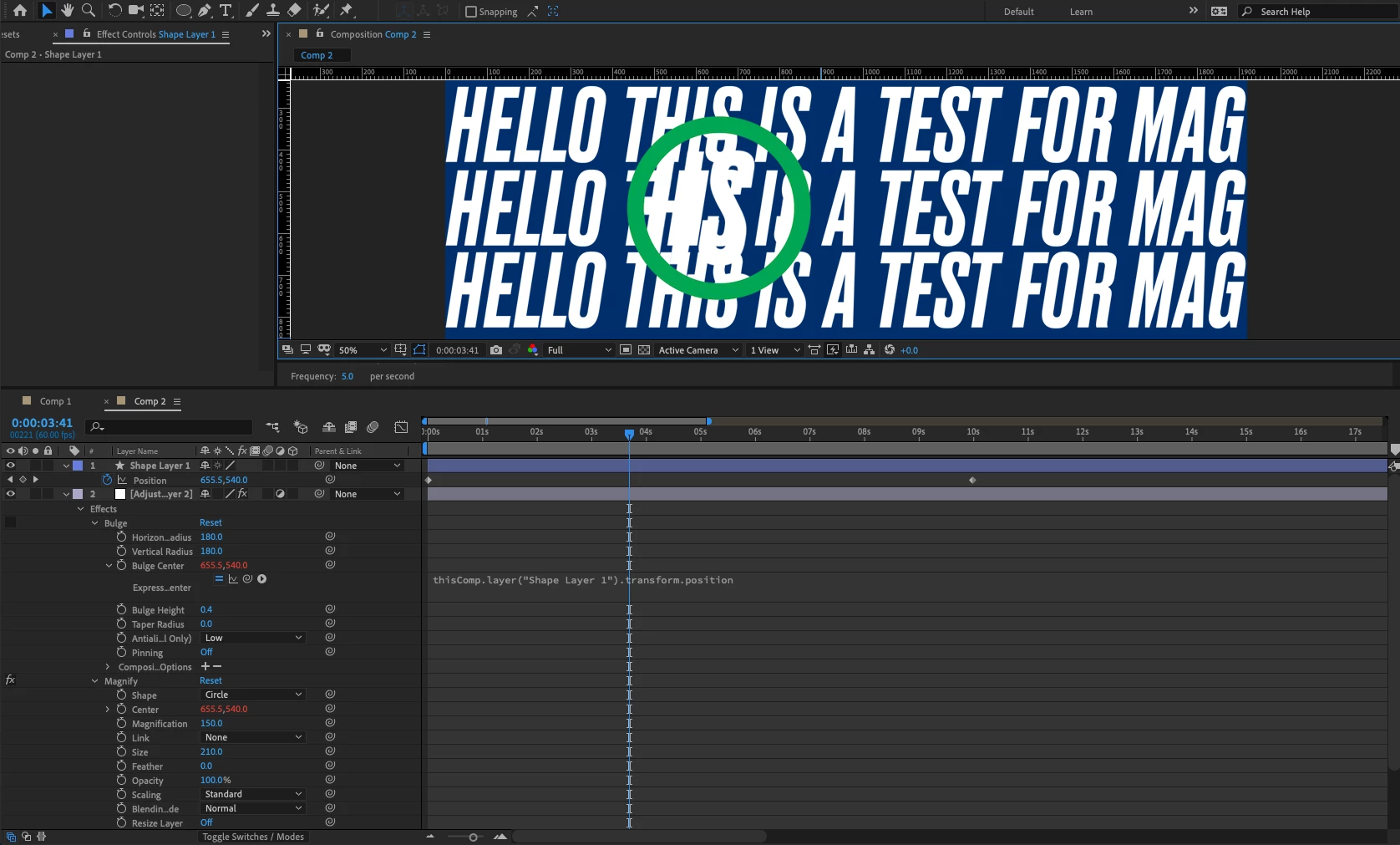
Any ideas why this might be happening?


Thanks.

 

Martin_Ritter
Martin_RitterCorrect answer
Legend
Feb 28, 2020 8:03 PM UTC

Put the effect directly on the layer instead of adjustment layer - does this help?


*Martin

11 replies

Participant
Nov 9, 2024 5:00 PM UTC

 I found the issue! Under Blending mode in magnify I need to set it to None rather than normal.


Translate
Inspiring
May 17, 2024 12:59 PM UTC

Create a background solid and put this under the layers/under your text layer

Translate
Aug 19, 2021 11:56 AM UTC

Is this problem specific to one font? Maybe try a different text font?

Translate
Participant
Aug 19, 2021 10:35 AM UTC

Correct Answer is really this need solid. and adobe should be accept this bug

Translate
Participant
Apr 17, 2022 7:06 AM UTC

Ye sthis is bloody irritating. Instead of releasing countless versions Adobe should trry to fix what's not working first. 
I hate working with Premiere too, give me Avid anytime. 

Translate
Known Participant
Jun 18, 2021 3:16 PM UTC

Has this ever been solved? I have the same issue and it's absolutely annoying. It used to work.


Translate
Participant
Feb 4, 2022 8:31 PM UTC

I am still having this issue and the whole "put a solid shape layer underneath it all and precompose" does NOT work whatsoever. It still is appearing to duplicate the animation I am trying to magnify a part of.

Translate
alecAuthor
Participant
Mar 2, 2020 10:19 AM UTC

Still have the same double vision effect, but I have found a work around.

Translate
Martin_Ritter
Martin_RitterCorrect answer
Legend
Feb 28, 2020 8:03 PM UTC

Put the effect directly on the layer instead of adjustment layer - does this help?


*Martin

Translate
alecAuthor
Participant
Mar 2, 2020 10:18 AM UTC

Not really. But have found a solution by combining the 2 responses and adding something else.


Solution:

Add a solid shape behind the text, then pre-composed the 2 elements, then added the effect to the new pre-composition.

Alec

Translate
Participant
Feb 28, 2020 5:48 PM UTC

I had the same issue, I created a solid and used it as background, the magnify effect would affect the solid too and cover the original text.

Translate