

Huynh Trung Thuan
Participant
May 16, 2020
Answered

Make a simple name for file path

  • May 16, 2020
  • 1 reply
  • 993 views

Hi everybody,  I'm new with extendscript and when i scripting have some problem. I want to make a script can apply my preset to layer but when I create file path to dropdown list. It create a long name with path.
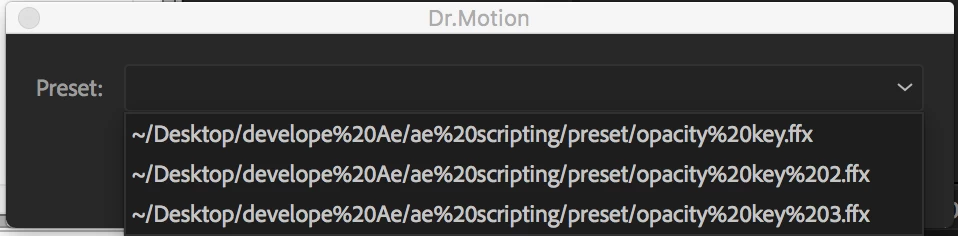
Can you help me to create a name for long file path and conect with ffx file locate in this folder?


var path1 = "Macintosh HD/Users/mac/Desktop/develope Ae/ae scripting/preset/opacity key.ffx"
var path2 = "Macintosh HD/Users/mac/Desktop/develope Ae/ae scripting/preset/opacity key 2.ffx"
var path3 = "Macintosh HD/Users/mac/Desktop/develope Ae/ae scripting/preset/opacity key 3.ffx"
var preset1 = new File (path1);
var preset2 = new File (path2);
var preset3 = new File (path3);


var mainWindow = new Window("palette", "Dr.Motion", undefined); 

var groupPreset = mainWindow.add ("group");
groupPreset.orientation = "row";
groupPreset.add ("statictext", undefined, "Preset:"); 
var myDropdown = groupPreset.add ("dropdownlist", undefined, [preset1,preset2,preset3]);

var buttonGroup = mainWindow.add ("group");
buttonGroup.add ("button", undefined, "Apply");
buttonGroup.add ("button", undefined, "Cancel");

mainWindow.show ();

Thank you for your help. Sorry for my bad english.


This topic has been closed for replies.
Correct answer Justin Taylor-Hyper Brew

If you want to display the full path, you'll want to decode your URIs, so you remove %20 and all that:

File.decode(myFile)

If you just want to select from a list of the filenames, then you can get the filename with displayName:

myFile.displayName

And store that in an array to reference your full file objects. 

1 reply

Justin Taylor-Hyper Brew
Community Expert
Community Expert
May 18, 2020

If you want to display the full path, you'll want to decode your URIs, so you remove %20 and all that:

File.decode(myFile)

If you just want to select from a list of the filenames, then you can get the filename with displayName:

myFile.displayName

And store that in an array to reference your full file objects. 

Huynh Trung Thuan
Participant
May 24, 2020

Thank you for your help, can you help me how to make a preset ffx file include in jsx file without linking file in external folder?

Justin Taylor-Hyper Brew
Community Expert
Community Expert
May 24, 2020

Yes you write it to a file, then encrypt the file as a binary string. Here's one way of doing it. Start a new thread if you have more questions on this since it's a new topic.


https://stackoverflow.com/questions/15087701/batch-convert-images-to-binary-strings