
Participant
December 28, 2021
Answered

Making a mountain in the background...

  • December 28, 2021
  • 1 reply
  • 391 views

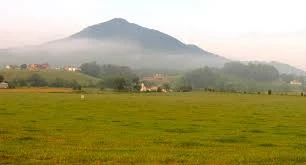
I am currently fiilming a ghostbusters fan film, I like the idea of haveing a mountain in the background of one specific shot. Could anyone help me, or give any pionters on how to do that? Included is an Image of the mountain I would like to have in the background.
 

This topic has been closed for replies.
Correct answer nishu_kush

Hi W22401313kkmr,


Thanks for writing in.

If I were you, I'd do it as follows:

  1. Separate the sky in the original image using Photoshop and save it as psd.
  2. Import the psd and Mountain footage in After Effects.
  3. Place the mountain in between the foreground and sky layer of the original image.
  4. Add some clouds/haze on top of mountain to make it look realistic.
  5. Lastly, color correct the composition.

Let us know if it helps.


Thanks,

Nishu

1 reply

nishu_kush
nishu_kushCorrect answer
Legend
December 28, 2021

Hi W22401313kkmr,


Thanks for writing in.

If I were you, I'd do it as follows:

  1. Separate the sky in the original image using Photoshop and save it as psd.
  2. Import the psd and Mountain footage in After Effects.
  3. Place the mountain in between the foreground and sky layer of the original image.
  4. Add some clouds/haze on top of mountain to make it look realistic.
  5. Lastly, color correct the composition.

Let us know if it helps.


Thanks,

Nishu