Participant
March 19, 2017
Question

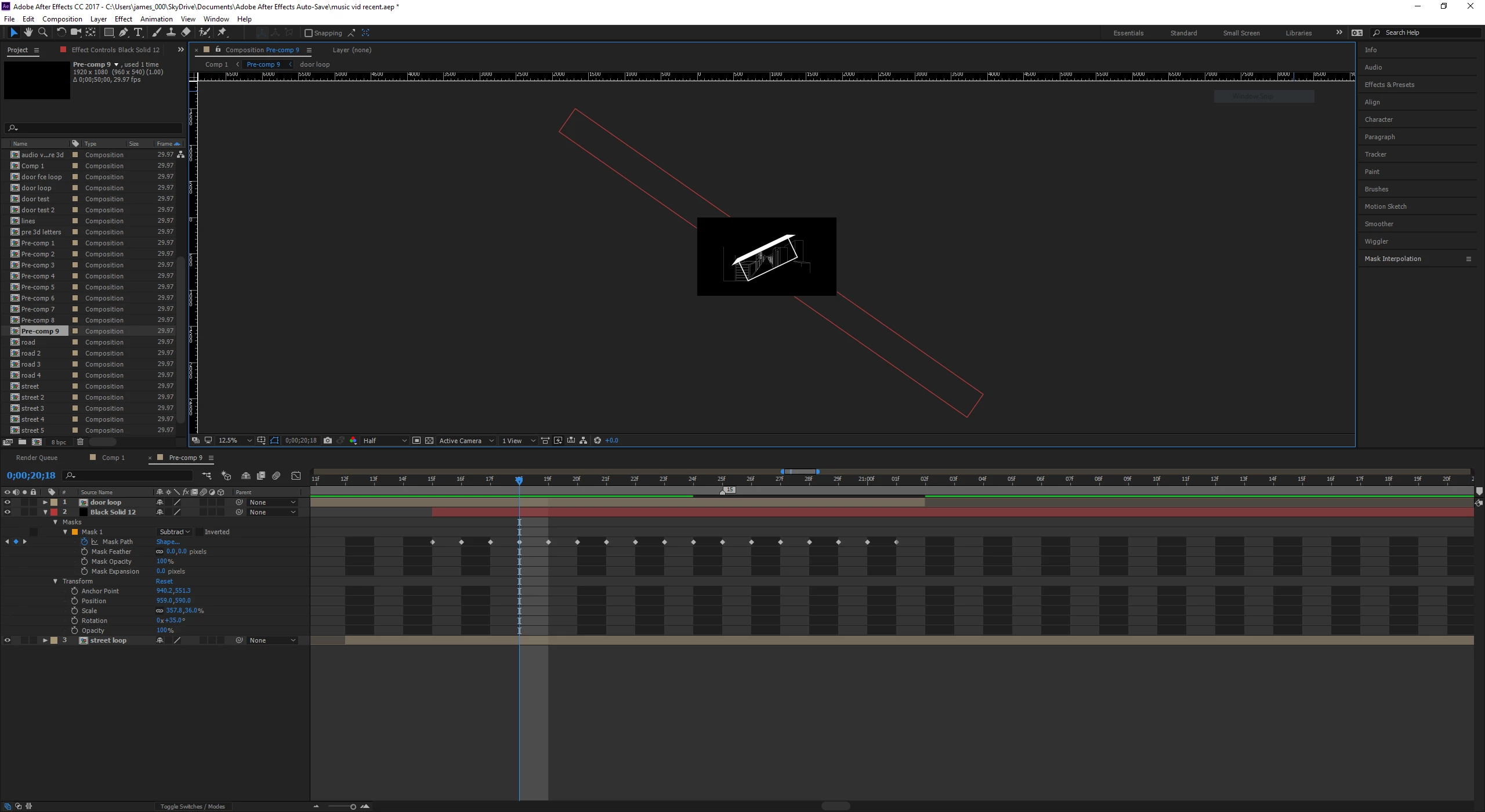
Mask not filling whole of screen, only portion of it.
  • March 19, 2017
  • 4 replies
  • 738 views

I'm probably just missing something very basic here but, I have a mask but as you can see in the picture it is a weird diagonal shape that isn't masking the whole screen but only a bit of it. I have it set to subtract. How do I make it actually mask the whole rest of the screen and mask the "street loop" layer, which is basically some vectors that are being scaled. Thanks.

This topic has been closed for replies.

4 replies

Participant
March 22, 2017

I cant really remember but I think I changed the order of pre comps or something, not sure.

Community Expert
March 22, 2017

It does not sound like you have followed my recommendations for troubleshooting. Start there and you're halfway home.

Participant
March 20, 2017

I've figured it out but thanks for replying anyway. In future i'll try and look through manual before asking something as these things probably have already been answered.

Szalam
Community Expert
Community Expert
March 21, 2017

What was your solution? Future-forum-goers may search and it would help to know what solved it for you.

Dave_LaRonde
Inspiring
March 20, 2017

jamess37202265  wrote

I'm probably just missing something very basic here but, I have a mask but as you can see in the picture it is a weird diagonal shape that isn't masking the whole screen but only a bit of it. I have it set to subtract. How do I make it actually mask the whole rest of the screen and mask the "street loop" layer, which is basically some vectors that are being scaled. Thanks.

Y'know, Bud, maybe you ought to take some time learning the AE basics before you decide to jump into the deep end of the pool. 

You'll find some fine beginner tutorials right on this here very web site.  I suggest you actually look at 'em.

Mylenium
Legend
March 19, 2017

According to your screenshot there isn't even a mask, this is merely the layer's bounding box. You are also probably looking more to use the inside of your doorway as an inverted Alpha matte rather than applying a mask to whatever layer directly.

Mylenium

Community Expert
March 20, 2017

You have not selected the layer with the mask so we can not see the shape of the mask path. I do see keyframes on every frame and that is a bit unusual. I also see very thin lines on what I think is the bottom layer. Thin lines in video can cause all kinds of problems. I also see a bunch of comps in your project panel. This makes me think this is a very complex project that you are trying to edit in AE. The fact that you are having problems with something as basic as masking is telling me that you do not have much experience in AE. 

To troubleshoot your comp start by soloing the layer you are haveing problems with, then turn on the transparency grid so you can't see what the mask is doing.  If that doesn't help you solve your problem then we need a lot more detail about your workflow and what you were trying to accomplish. As I said answering the other post you made on this almost identical subject, show us the modified properties of the layers giving you problems by pressing the U key twice. Make sure you explain what you're trying to do.