

beerai
Participating Frequently
September 23, 2019
Question

Mask/Track Matte Multiple Layers
  • September 23, 2019
  • 4 replies
  • 19587 views

Hi again,

First off, I'm a beginner. And I'm having a bit of a tough time understading how Track Mattes and Masks work. I understand masks from Ps/Ai but not Tracks' in Ae. 

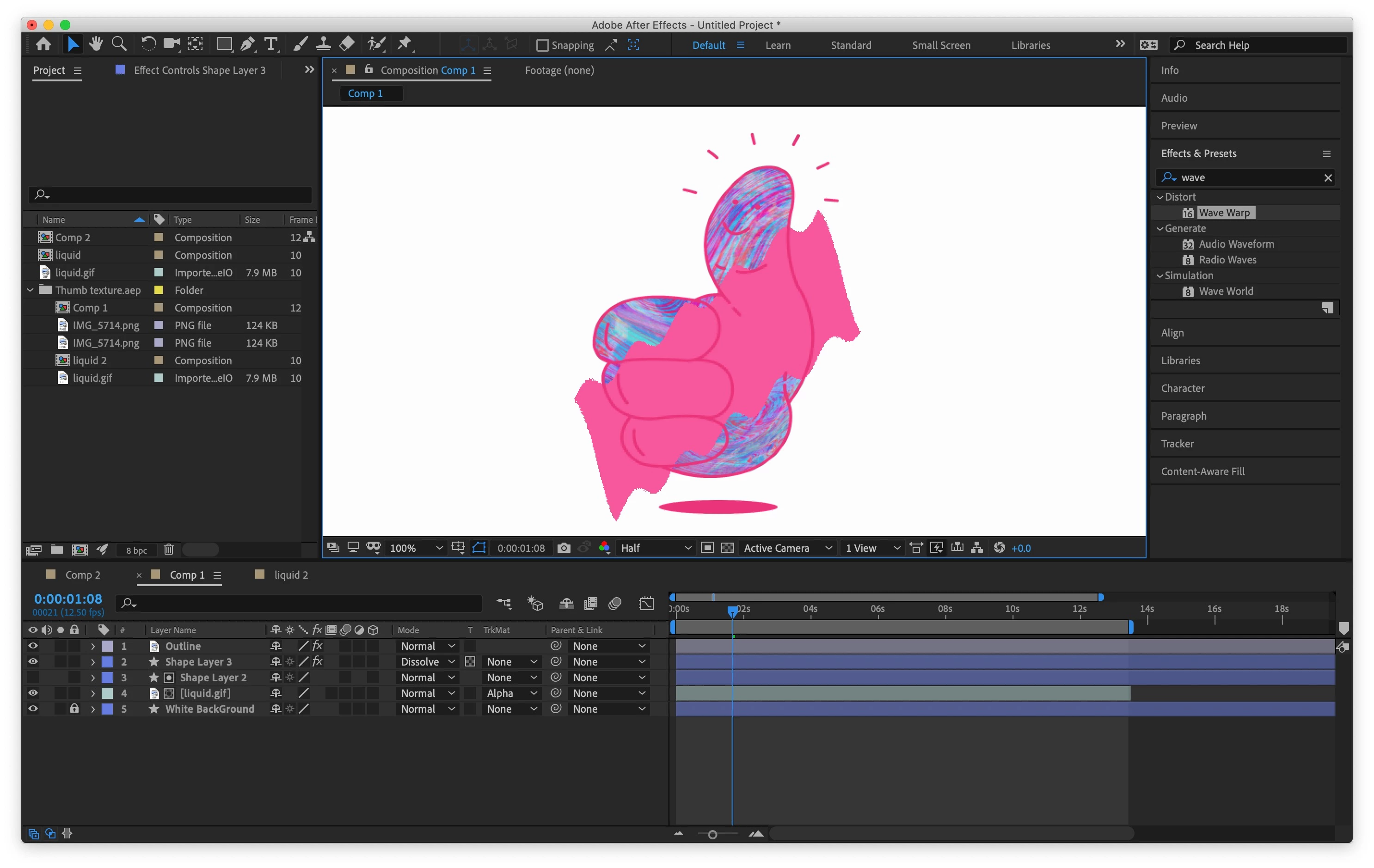
In the screenshot below is what im working on - very simple stuff. All i want is for MULTIPLE layers to mask OR track matte to one shape/layer - regardless of order (if possible)

There is:

White BackGround - on lock

Liquid Gif - a loopOut comp (which I have Alpha tracked to Shape Layer 2)

Shape Layer 2 - block fill of my illustration 

Shape Layer 3 -  the rectanlge with wave warp effect (in pink)

Outline - the main illustration 

In all, all I want is for Liquid Gif and Shape layer 3 to both mask Shape Layer 2 (the block fill) But because of track matting only working on the single layer above I cant work out how to get them both to work the same.


I have no idea if any of my order is right. If my logic about this is poor please call me out on it and nerd over it! Any tips are welcome 


    4 replies

    Community Expert
    September 24, 2019

    What Roland says + one more suggestion. Many times Pre-composing is the simplest option. Lots of folks think Pre-composing complicates things and makes comps harder to work with but the opposite is true. They are a great organizational tool that simplifies workflows.

    Roland Kahlenberg
    Legend
    September 23, 2019

    A Track Matte requires the Matte Layer to be placed DIRECTLY above the Fill Layer. Hence, only one Fill Layer can access a single instance of a Matte Layer. To get multiple/different Fill Layers to work with a single Matte Layer, you'll have to duplicate the Matte Layer.


    A more elegant way is to use the Set Matte effect - Effect>Channel>Set Matte. With the Set Matte effect, multiple Fill Layers can access a single Matte Layer. HTH.

    Very Advanced After Effects Training | Adaptive & Responsive Toolkits | Intelligent Design Assets (IDAs) | MoGraph Design System DEV
    liam3d
    Participant
    September 6, 2021

    Brilliant info, thanks! I used to to give a single layer multiple Matte information.

    Brandon Loshe
    Legend
    September 23, 2019

    Hi beerai,


    If you precompose Liquid Gif and Shape layer 3 and then make that composition the track matte, does that work the way you want it to?

    beerai
    beeraiAuthor
    Participating Frequently
    September 23, 2019

    UPDATE

    I copied the Shape Layer 2 and just had that mask the Shape Layer 3  - it has worked. But is there a more sophisticated way of doing this rather than adding copied layers?