
Participating Frequently
April 4, 2018
Resuelto

Media Encoder April 2018 - H.264 Hardware Acceleration - which Macs?

  • April 4, 2018
  • 5 respuestas
  • 7388 visualizaciones

I am curious - does anyone know which Macs have hardware acceleration for H.264 encoding in the just released updated version of Media Encoder.

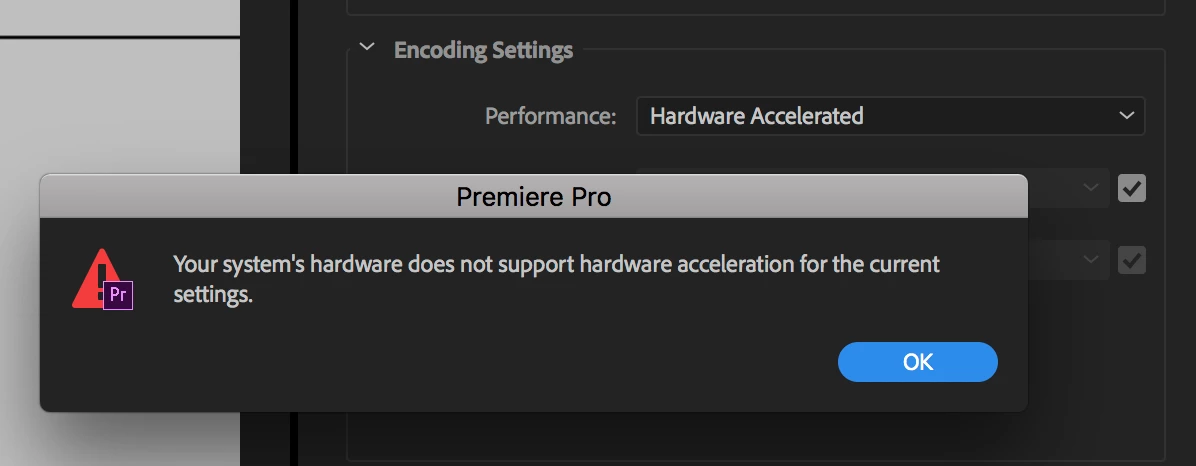
My screenshot is from my 8-core iMac Pro, which for some curious reason does not qualify...
    Este tema ha sido cerrado para respuestas.
    Mejor respuesta de thnord

    Wow, this definitely is a HUGE dagger to all of us who are now iMac Pro owners. Is there any possible road map for AME to render quicker on iMac Pros in the near future? I am just wanting even a little hope if at all possible.


    I would like to clarify that while most Xeon processors are not supported the iMac Pro IS supported. If you are seeing otherwise please let me know.

    5 respuestas

    Participant
    November 22, 2018

    Same here!

    AME2019

    H264 @ VBR1pass Hardware Encoding available on rMBP Mid-2015 (guess because of Intel Quicksync) which does the job a lot slower than my Mac Pro 12c on sw encoding. It almost flies up in the air cause of the fans hitting a trillion rpm! LOL
    oh and in my case NOT available on:
    Mac Pro 6,1 12core 2xD700
    Mac Pro 5,1 Xeon Haswell 4core Nvidia GTX960 (HW H264/265 Encoder build in)

    Worthless if you ask me..

    :/

    Participant
    June 28, 2018

    Hardware encoding working flawlessly, astonishingly, on an early Macbook Pro 2015 with Intel Iris graphics.

    Participating Frequently
    June 5, 2018

    This worked fine for me on a 3 year old computer (PC). Now only VBR 1 Pass works on a new Dell XPS 15

    I find it incredible that Adobe charges an arm and a leg for software so full of bugs and setbacks at every update.

    Participant
    April 25, 2018

    windows 10 here and after effects cc lastest version. with nvidia 1070 and says software only. in AME.

    very slow with lastest updates. hardware encoding says not compatible... with VBR 1-pass

    Participant
    November 30, 2018

    You have to go into your bios and force enable your CPU internal graphics, this will allow the option of Hardware Encoding. Running my first test right now and it exported about twice as fast. Now just need to compare the quality of the exports!

    Participant
    November 30, 2018

    Forcing only needed if you also have dedicated GFX card in your PC. And in case of an iMac or Macbook Pro you can use a switcher.

    Andrew Yoole
    Inspiring
    April 4, 2018

    Hardware accelerated H264 encoding is a Windows Only feature in the current release.

    Participating Frequently
    April 4, 2018

    But Adobe's "what's new" page specifically mentions Macs running 10.13 with "supported hardware".

    Which hardware is supposed to support that feature, remains a mystery.

    Andrew Yoole
    Inspiring
    April 4, 2018

    My apologies, you are correct.  I posted about hardware accelerated DECODING rather than ENCODING - my bad.

    I've Googled around and can't find any reference material that lists what supported hardware might be on either Mac or Windows machines.

    Perhaps someone closer to Adobe knows the whereabouts of such a list and can post it.