
Participant
Jul 23, 2017 11:53 AM UTC
Question

Mediacore Plugins Error

I got a fresh new windows 10 and when trying to run after effects (fresh update), it gives me this error, because of which I am not able to import any video files.
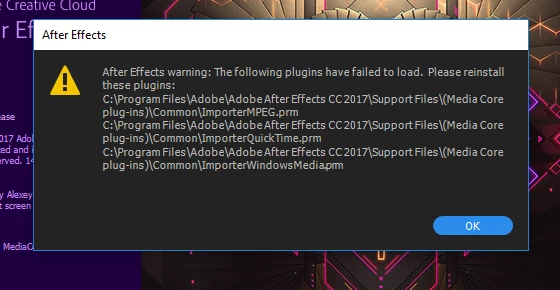
Tried reinstalling windows and after effects a bunch of times but the error doesn't go away.

Please help, my projects are in frozen state because of this.

This topic is closed to new replies. Start a new post to keep the conversation going.

11 replies

Participant
Oct 7, 2019 7:44 AM UTC

Hi all, Just a simple...

u can move file all about (.prm) from
C:\Program Files\Adobe\Adobe After Effects CC 2019\Support Files\(Media Core plug-ins)\Common

to

C:\Program Files\Adobe\Adobe After Effects CC 2019\Support Files\(Media Core plug-ins)


and done...

Hope this helps

Translate
Participant
Nov 17, 2019 6:17 PM UTC

did't work


Translate
Participant
Apr 12, 2018 2:42 PM UTC
Participant
Jan 14, 2019 6:29 PM UTC

It worked for me too, thanks!!

Translate
Kevin J. Monahan Jr.
Legend
Aug 16, 2017 10:10 PM UTC

Hi TyreseCaps,

See if this post assists you: Re: ImporterWindowsMedia.prm plug-in error

Thanks,
Kevin

Translate
Kevin Monahan - Sr. Community and Engagement Strategist – Adobe Pro Video and Audio
Mike_Abbott
Legend
Jul 23, 2017 1:08 PM UTC

Is Premiere pro installed? If so is PPro also updated to match Ae? If not I'd update it and see if that helps.

These MediaCore files are common to both apps

Translate
Participant
Jul 23, 2017 7:01 PM UTC

Premiere Pro is the latest version and matches After Effects. The mediacore files are common to both but only Premiere reads them while starting. After Effects fails to load them. I've checked in the "common" folder. All the plugins are there.

Translate
Participant
Jul 23, 2017 12:34 PM UTC

Also, I've already checked all the previous posts and solutions. Updated all the updates for windows 10 as told by Tim in some other post, Nothing works.

Translate
Vinay Dwivedi
Adobe Employee
Adobe Employee
Jul 23, 2017 5:28 PM UTC

Hi Ash,

Seems to be Window 10 N and kn issue which does not support MP4, h.264 etc. Try the below link to install Windows Media Player codecs and check if it helps.

https://support.microsoft.com/en-us/help/3010081/media-feature-pack-for-windows-10-n-and-windows-10-kn-editions

//Vinay

Translate
Participant
Jul 23, 2017 6:59 PM UTC

Already tried that. I guess I have to downgrade to windows 8. Premiere Pro is working fine with updated version.

Translate