


Double-D-Dean
Participant
September 19, 2023
Question

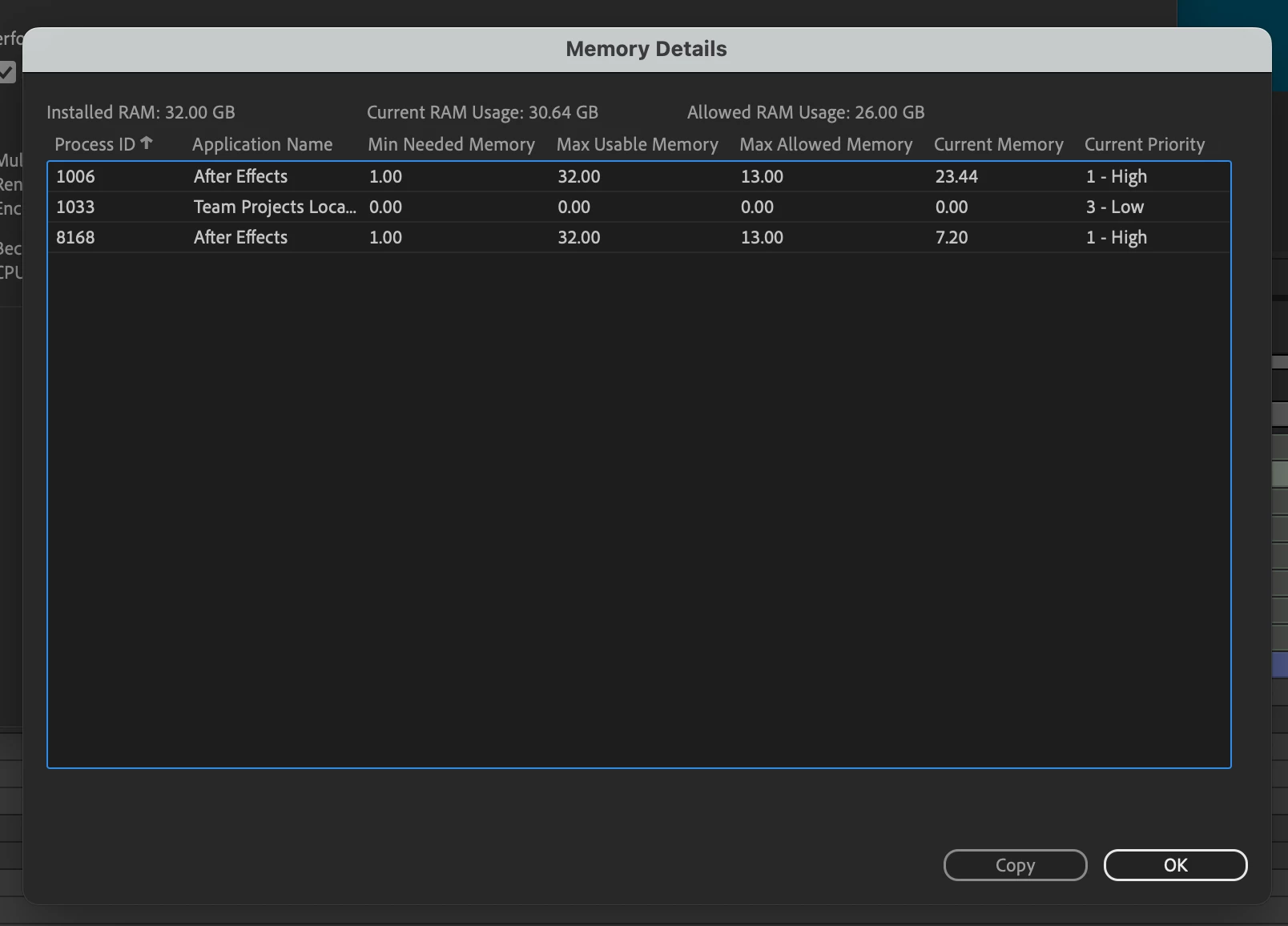
Memory Details - Duplication of After Effects process allocation in RAM

  • September 19, 2023
  • 3 replies
  • 623 views

Hi there,

I have an issue where there is a duplication of RAM allocation to the application. AE therefore uses up more RAM than it should. The only way to resolve this duplication seems to be by restarting my Macbook Pro M1 (Ventura 13.5.2) . I'm running AE 23.6. Clearing the memory within AE does nothing.

Anyone else had this issue / know a solution without a manual restart? Thanks
This topic has been closed for replies.

3 replies

Participant
January 21, 2024

I also have the same problem. But when I just created a new project, there were already 2 AE. And that makes the RAM needed higher than the RAM I have. So I think it prevents me from watching the playback even if I lower the quality to quarter. 


Double-D-Dean
Participant
September 20, 2023

Thanks jenkmeister, that makes more sense now. 

September 19, 2023

The second instance is likely from the use of something like Camera Tracker or Warp Stabilizer. It's not a duplication (current memory indicates different sizes), but some other part of AE that has spun up under a separate process.