MahaB82A
Legend
August 23, 2022
Question

Merged/Choose Layer

  • August 23, 2022
  • 3 replies
  • 2394 views

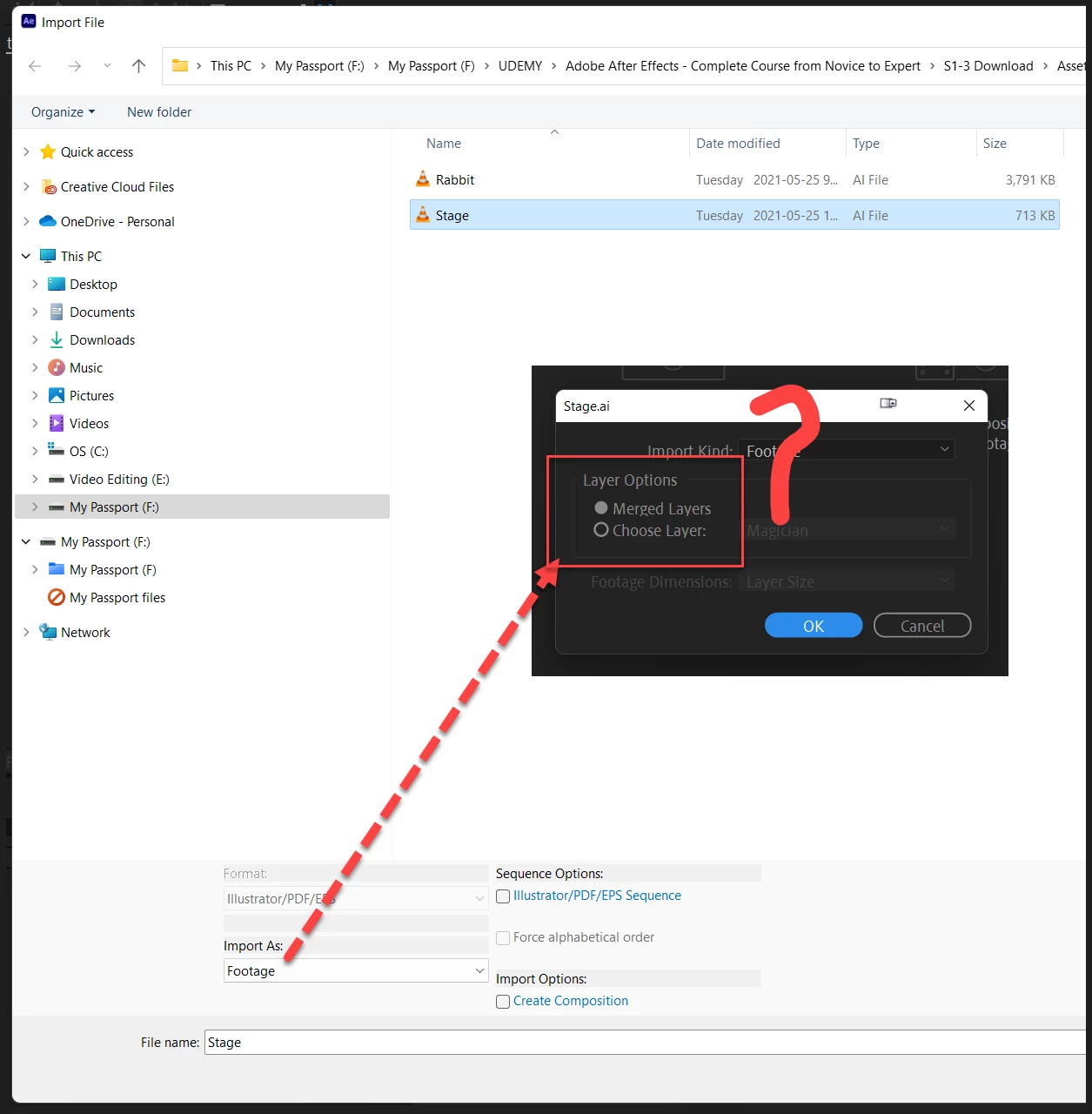
Stage file name was selected & imported as Footage as option, resulted to this dialog box.


Is there any tutorial explining about Merged/Choose Layer?


This topic has been closed for replies.

3 replies

Joost van der Hoeven
Community Expert
Community Expert
August 25, 2022

MahaB82A
MahaB82AAuthor
Legend
August 25, 2022

My one is 2022v. Therefore I cannot see Create Composition option in the older version. I tried to replicate the work but I cannot explain the result. Video is attached.


Inspiring
August 25, 2022

Change the option under the "Import As" dropdown menu.

Warren Heaton
Community Expert
Community Expert
August 23, 2022

Part of After Effects' support for still image file formats like Photoshop and Illustrator includes referencing the full file (Merged Layers) or part fo the file (Choose Layer).

  • With Merged Layers, After Effects sees the PSD file or AI file as the Source Footage
  • With Choosse Layer, After Effects see the chosen layer as the Source Footage and the PSD file or AI file like a folder containing the source


If you open your file named "Stage.ai" in Adobe Illustrator, you can use the Layers panel to view and edit the Layers based on how you want to use the document and/or layers as Source Footage in After Effects.


A good way to get used to how these import options work and influence how you can animate is to try each one after viewing the document in Illustrator.  Also try Import As Composition which chooses each layer and attempts to match what the Photoshop/Illustrator document looks like as an After Effects Composition.


A newer way to import Illustrator files is to open them in Adobe XD, select it, and then send it to After Effects.  This approach gives priority to the Objects in the Illustrator file over the Layers.  Assuming you have an All Apps Createive Cloud subscription, this approach is worth exploring.


If you don't have Illustrator, you can still try all the import options in After Effects.  You're just doing so without the added benefit of seeing the contents of the Illustrator file ahead fo time as well as how it appears in Illustrator compared to how it appears in After Effects.

MahaB82A
MahaB82AAuthor
Legend
August 24, 2022

PSD ?? - Paint Shop or Photo Shop? what is meant by D? 

Inspiring
August 25, 2022

PSD stands for Photoshop Document.

Inspiring
August 23, 2022

In After Effects, footage doesn't just mean video, but this is the Adobe Illustrator import dialog. After Effects thinks your file is a .ai file because that's what Windows thinks it is. If you look to the right of your Stage file, you can see what Windows thinks it is. What's the file extension of your footage? Is this actually an Illustrator file or is it video? If it is a .ai file then you need to go into the Windows prefs and change AI files to open with Illustrator instead of VLC.

MahaB82A
MahaB82AAuthor
Legend
August 23, 2022

I do not have AI. This is tutorial's downloaded folder. But I have VLC media player.


Inspiring
August 23, 2022

If you don't have Illustrator installed, then I'm guessing these are actually AI files. What are you looking to do, animate the layers in each file or work with the flattened graphic? If the former, then you want to change the dropdown menu at the top from "Footage" to "Composition - Retain Layer Size." This will allow you to import the Illustrator file as a layered composition to animate individual elements.
