
Inspiring
October 11, 2018
Question

Merging Mask Paths

  • October 11, 2018
  • 6 replies
  • 19464 views

Hello forum.

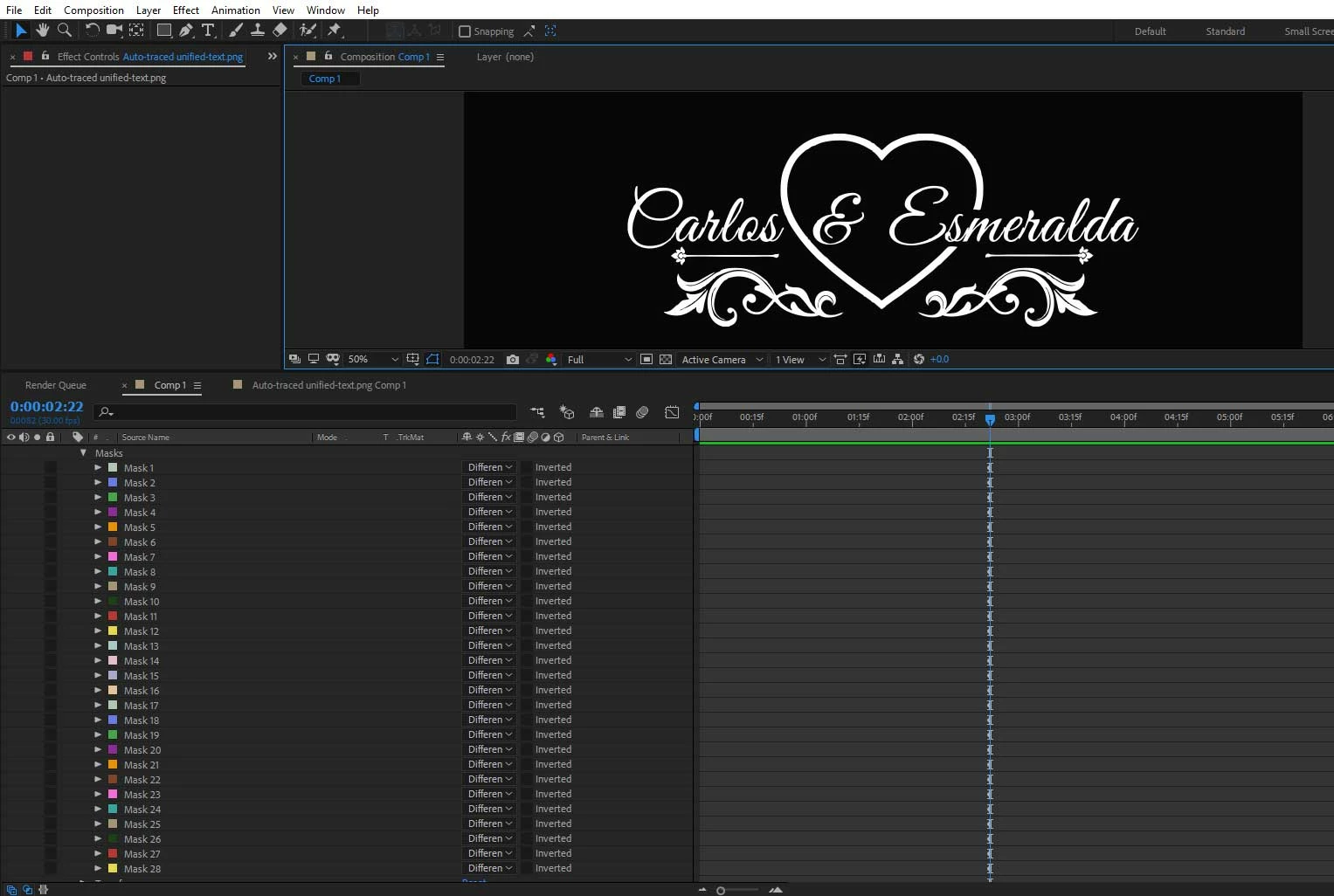
I was wondering if multiple mask paths can be merged into one single masked path. In my screen shot, I imported a PNG file

and I chose to auto trace it, so it made all these masked paths. (Considering I want to put some sort of FX going through that mask).

So I tried to precompose the layer to see if that would work, but it didn't. I also tried track matte to see if it would work, in case the FX would see the precomposed layer as one mask. So is there a way AE can make all these paths into one mask?

PS: I know I can drag and drop the FX onto my PNG file and it works fine, but this is mainly for educational purposes I'm inquiring.

Thank you.
    6 replies

    Inspiring
    November 6, 2025

    You can copy/past both Masks to Illustrator. Then you can use Join and/or Pathfinder to combine 'm. And then copy/paste back to Ae.

    verawammie
    Participant
    January 16, 2024

    I have exactely the same problem, I want to morph two png shapes but because my mask consist of 10 different masks, it's impossible. Did you find a solution yet?


    Known Participant
    November 18, 2023

    Was this ever submitted as a Feature Request? It's such a helpful feature.

    angie_taylor
    Legend
    October 11, 2018

    You cant group paths together if they are masks but you can group Shape layer paths together. So depending on your reason for grouping them, this may be an option as you can then use the Merge Paths function. To do this, create a new shape layer, add a new path to it and select it copy the masks, then paste them into the shape layer. Select them all and hit Command/ Ctrl-G to group them. You can then use Merge Paths operator on whickever you need to merge. Alternatively, copy and paste your masks into Illustrator, use Pathfiner to merge them, then copy and paste back to AE.

    Inspiring
    October 12, 2018

    Hi Angie.

    I did try a few of your options, but because this was a PNG file, the Shape layer options didnt seem to work. The only option which seemed to do the trick but needed amendments was the copy paste into illustrator. But the problem was, because the masked paths are not jointed together, once pasted into AE again, they get pasted on individual paths again. Meaning that next time Ill have to keep in mind the words, letters, shapes which I import to be joined from their initial design. As you can see here in the screen shot, the RED is the original PNG file autotraced, and the blue is what was copy pasted into Illustrator, once pasted again into AE I still get lots of masked paths again.

    Thanks heaps for your input.

    Kind regards.

    OussK
    Community Expert
    Community Expert
    October 11, 2018

    So what type of FX you want to use? because some FX are already see single mask or all mask together

    Inspiring
    October 12, 2018

    Its called CC light sweep. I don't need a mask for this, it'll work fine with any PNG image.

    Roland Kahlenberg
    Legend
    October 11, 2018

    No. Please send in  a Feature Request.

    Meanwhile, this script has a merge mask feature, among other very cool thingies - Advanced Mask Editor 2 - aescripts + aeplugins - aescripts.com

    Very Advanced After Effects Training | Adaptive & Responsive Toolkits | Intelligent Design Assets (IDAs) | MoGraph Design System DEV
    Inspiring
    October 11, 2018

    Hi Roland, sleek plugin for AE, something I wouldn't buy at the moment because I can use an alternative method to appease

    my AE needs, but certainly worth the money, if someone works extensively  with masks within AE. And I'll be for sure submitting a request if it'll be taking into consideration by Adobe.

    Kind regards.