
Merging shape layer contents into one path with scripting
I have a project where there are multiple styling layers that all share the same path referenced by a blue shape layer
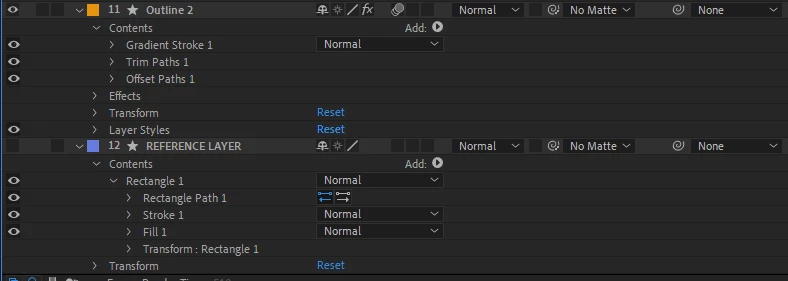
in this example I have an orange shape layer that has strokes and trim paths (stylization), beneath this layer there is a reference path layer that should be used on orange only as a path. Now in this exact case I can just copy the rectangle path and paste it into the orange layer (which is what I actually did) but lets say I have 100 of these stylization layers and copying the path to all of them one by one seems a little bit time consuming. And the idea of having to re-copy all of it when I make the slightest change to the reference path doesn't amuse me too.
So the possible solution would be to create a path on an orange layer and make an expression like
path = thisComp.layer("REFERENCE LAYER").content("Group 1").content("Path 1").path;
But if I want to do that I need to merge all my contents in the reference layer into one path. Merge paths doesn't look like an option here because there is no path property for a merge paths instance. Can it be done with JS scripting?


 AdChoices