
Trickooo
Known Participant
May 5, 2017
Answered

Merging Shape layers, apply twist effect

  • May 5, 2017
  • 1 reply
  • 854 views

Hi.


I am new in the AE. I am wondering if there is some way to merge all layers, also pre-compose layers into one layer and add a twist effect to it. I want to create twist effect to the middle center point and after that create a logo from that point, but I have around 100 layers, so I don´t want to do it manually with all layers just one-by-one.
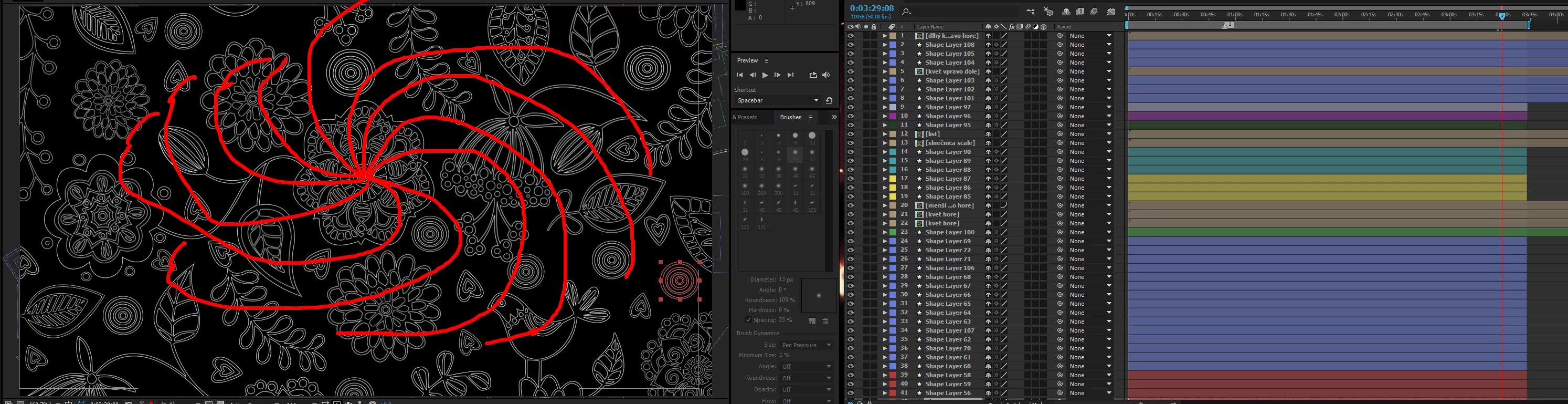
So in shor I wanna move all paricles into the center point with twist effect, just with a few clicks. Any suggestions?

    This topic has been closed for replies.
    Correct answer Mylenium

    No. That's just it. Layers are layers. If you want genuine motion, you have to create genuine motion. Some things just come the hard way. Otherwise you can of course use distortion effects and scale the layer in sync to create an illusion, but this probably won't give any satisfying look since it warps the actual shapes and they become a mush. Conversely, you could have used a particle system to explode the shapes on teh screen and then time-reverse that pre-comp, but you can't control where each particle ends up. So for what it's worth you really have to get down to it. 100 layers isn't really that much, considering that you can copy & paste keyframes easily and since you are already using shape layers, all that is required is proper grouping to move the items from the outside in whil scaling them and one level above you only need to have some simple rotation to create the illusion of a swirl...

    Mylenium

    1 reply

    Mylenium
    MyleniumCorrect answer
    Legend
    May 5, 2017

    No. That's just it. Layers are layers. If you want genuine motion, you have to create genuine motion. Some things just come the hard way. Otherwise you can of course use distortion effects and scale the layer in sync to create an illusion, but this probably won't give any satisfying look since it warps the actual shapes and they become a mush. Conversely, you could have used a particle system to explode the shapes on teh screen and then time-reverse that pre-comp, but you can't control where each particle ends up. So for what it's worth you really have to get down to it. 100 layers isn't really that much, considering that you can copy & paste keyframes easily and since you are already using shape layers, all that is required is proper grouping to move the items from the outside in whil scaling them and one level above you only need to have some simple rotation to create the illusion of a swirl...

    Mylenium

    Trickooo
    TrickoooAuthor
    Known Participant
    May 5, 2017

    Thanks for reply. I did it manually, layer by layer, and you was right, just copying keyframes take me around 30 minutes to did it. Thanks for your time