Inspiring
December 24, 2017
Answered

Migrate settings

  • December 24, 2017
  • 3 replies
  • 70356 views

I get this message when loading an after effects project.Does anyone know what exactly I have to do here since I am not a experienced after effects user?
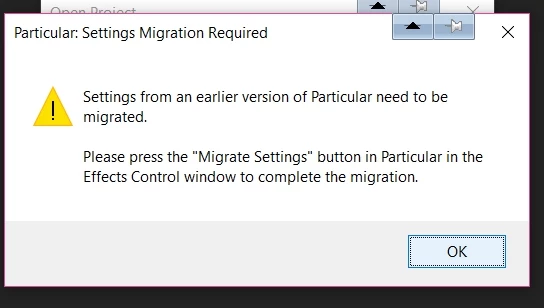
Thanks alot in advance

This topic has been closed for replies.
Correct answer Kevin-Monahan

Bijouz,

This should help: migrating settings and plug-ins for After Effects CC 2014 (13.0) | Creative Cloud blog by Adobe

Thanks,
Kevin

3 replies

marawanco
Participating Frequently
November 20, 2021

Kevin-Monahan   

The link to the solution is no longer working so do that :

1-  open after effects teamplate or apply pro fx particular or what ever .

2-  In the poject panel search for particular folder & open it .

3-  Open every composition that contains a layer with a particular .

4-  In the Effect Control press ( Migrate Setting ) .

5-  Finally, if you use pro fx particular ... opent it & apply the particular .

Screenshot  :

 good luck .

bijouzAuthor
Inspiring
January 8, 2018

No after effects wizards here? :-)

Kevin-Monahan
Community Manager
Kevin-MonahanCommunity ManagerCorrect answer
Community Manager
January 20, 2018
Kevin Monahan - Sr. Community and Engagement Strategist – Adobe Pro Video and Audio
Participant
June 7, 2021
Screen_Shot_2021-03-23_at_11-26-26.jpg

Why has no one answered that you have to be on the actual layer with the particular effects for that "migrate settings" button to appear in the effects window. Each layer with particular has to be selected and migrated. Is there an easier, single button affects all particular effects migration on all layers to occur?

bijouzAuthor
Inspiring
December 25, 2017

I just cannot find the "migrate settings" anywhere :-(
I am not an experienced user , just loaded an after effects template and got this message

been looking in the effects window , under particular , but don't see a migrate settings option anywhere

mnorto23
Participant
November 19, 2020

Did you ever get this solved? I am having the same issue. I will include screenshots to show that no layer in this comp has the effect "form." And there is nowhere in the effect controls panel that has the "migrate settings button." You can also see in the side panel that I do in fact have the RG Trapcode form plugin installed. Also, this is from a template and is already saved as a converted version. Please help if you can!!

^this one shows the trapcode plugins