


leo9x
Participant
August 12, 2016
Answered

Missing Gaussian Blur effect in After Effects CC 2015

  • August 12, 2016
  • 1 reply
  • 14035 views

Hi,

I'm a newbie in After Effects. When I open an AE project, I got a warning regarding a Gaussian Blur missing.

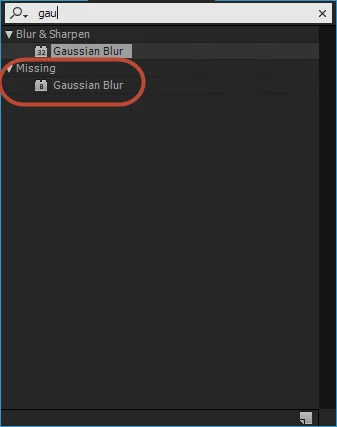
The problem here is Gaussian Blur has been installed on my computer. I have searched the effect on Effects and Presets, please refer to the image.

I wonder that is the number 8/ 32 it may cause?

How can i fix this or get it?

Many thanks.
    This topic has been closed for replies.
    Correct answer Victoria Nece

    Hi Roei,

    Thanks for the detailed guide. However the 32 bit Gaussian Blur effect doesn't have repeat edge pixel option that is needed in my project. Is there any workaround for that? Thanks!


    There is a new script that is included with CC 2017 that will enable you to "upgrade" legacy Gaussian and Fast blurs to use the new GPU-accelerated Gaussian Blur effect (which includes Repeat Edge Pixels).

    1 reply

    Mylenium
    Legend
    August 12, 2016

    Simply substitute the effect and duplicate the settings. Several effects have been rewritten over the years and the newer versions have been given new internal "match names". Visually this should make no difference or only minor, if at all.

    Mylenium

    leo9x
    leo9xAuthor
    Participant
    August 12, 2016

    Hi Mylenium,

    Thanks for your support. In this case, my project is contained many objects (which are applied the effect), if I duplicate the setting that mean I will spend numerous time for editing. Are you sure about the difference without?

    Btw, how can I get the older version like Gaussian blur (8)?

    Mylenium
    Legend
    August 12, 2016

    You can't simply copy effects from other versions over. The effect registering under a different match name would indicate that it's from an older version and it won't load. You simply have to put in the time. The only other option may be to install an intermediate version like CS5.5 or whatever that may be able to handle this gracefully and adjust the effects references automatically, but we realyl can't know.

    Mylenium