


Inspiring
March 28, 2020
Question

Missing Media When Exporting in Media Encoder

  • March 28, 2020
  • 11 replies
  • 21458 views

Hello, I'm trying to export a 3-minute video in After Effects. It's made up of animated text in nested comps, background videos, MotionBRO transitions, and music.


First, I tried to export the Lossless AVI directly from the Render Queue but the video would come out with several errors and audio popping in and out.


When I export the H.264 file in Media Encoder, it works perfectly except for one section where I have a couple of nested comps. (A cell phone animation and nested text). It shows up as bars and tone on the preview and in the exported video. In After Effects, however, the comps are visible and there is no missing media. What is going on and how do I fix this? 
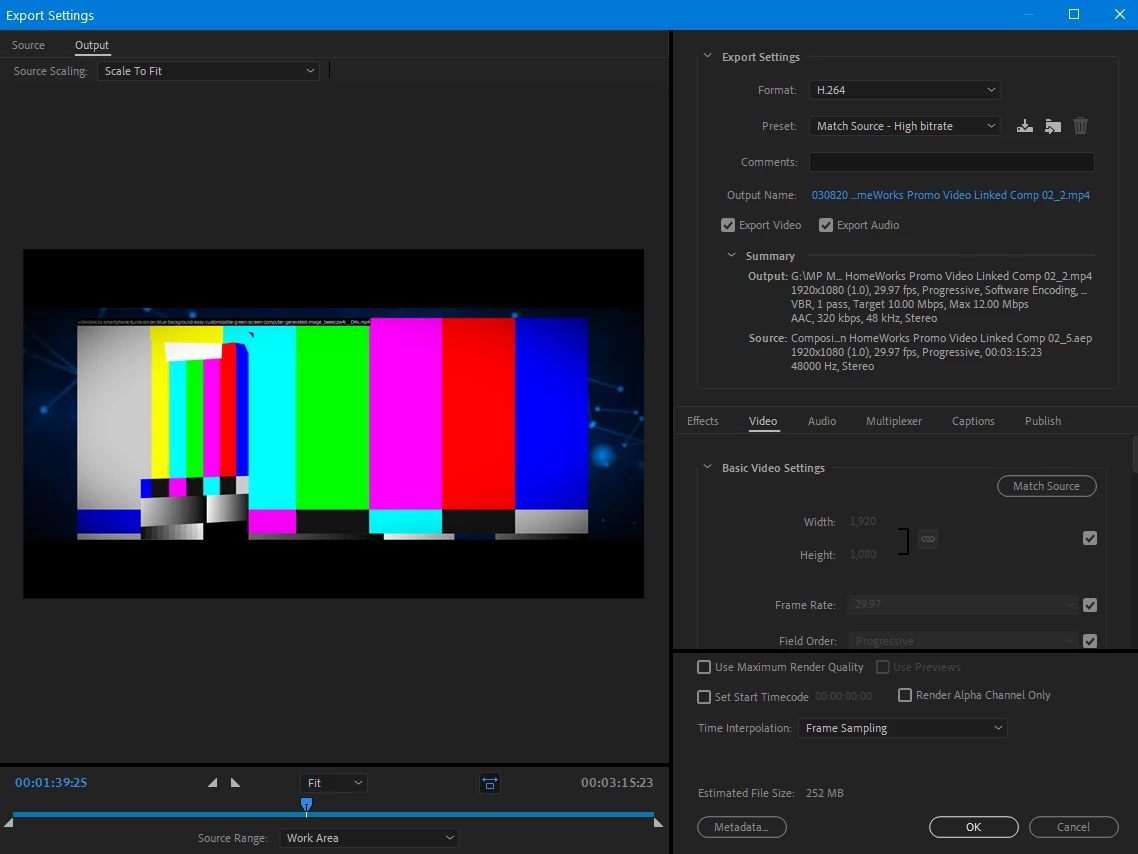


Thank you!

11 replies

Siirvend
Participant
November 23, 2020

Im having the same issue here. Odd thing is that Ive encoded it multiple times and each time a different clip will be missing and the previously missing ones are there once again. I have no idea what the issue is since nothing has changed and everything shows up in the After Effects preview.

Siirvend
Participant
November 23, 2020

EDIT: I got it to work fine after rendering a few times! The only change I made was going into the original working file in After Effects and finding the video clip in my imported media library. I right clicked and selected "reload" on each of the offending clips. Visually it changed nothing, but I rendered a final time and everything came out alright. Another thing of note is that I kept After Effects open while the media encoder app did its work, whereas before I closed it and loaded the composition in the encoder on its own.


Hope this helps! Im not sure if it actually did anything or I just got lucky but I figured Id let you and anyone else know!