


Known Participant
Jan 24, 2021 4:21 PM UTC
Answered

Missing methods in extendscript - differences between machines and installations

Hey guys,

I have a strange case where several extendscript methods are missing on my main computer, where they are present in my beta installation, or on fresh installations on other computers. I can't explain the difference in possibilities. Any help is much appreciated.

What i've tried so far:
Uninstall / reinstall every adobe app

Uninstall / reinstall every adobe app with the adobe cleaner tool.


The difference can be seen when alerting a reflect of an array:

var myArr = [];
alert("reflect\r"+myArr.reflect.methods.join(","));

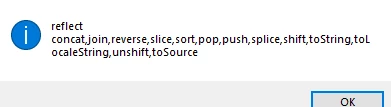
This results in the following alert in my main pc:

But this one on all other pcs/installations i've tried so far, including beta on my own main pc:
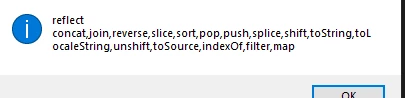

Notice the methods at the end: 
indexof, filter and map.

Any explanation would be most welcome. 
A potential fix would be perfect!
Thanks guys!

Justin Taylor-Hyper Brew
Community Expert
Jan 29, 2021 4:17 PM UTC

ExtendScript is based on the ES3 which dos not come with Array.filter, Array.indexOf, etc, however some messy 3rd party scripts modify the prototype which results in extra or missing methods. If you're seeing these on fresh installs, then you must have a script somewhere, in your user / global scripts older and or in your startup scripts. 

11 replies

highermedia
Participant
Sep 1, 2023 6:59 PM UTC

Per Justin T's reply, because ExtendScript is based on an older or stripped down of Javascript, you may not have some functions. I added Array.map with this:

Array.prototype.map = function (callbackFn) {
    var arr = [];
    for (var i = 0; i < this.length; i++) {
        /* call the callback function for every value of this array and       push the returned value into our resulting array
        */
        arr.push(callbackFn(this[i], i, this));
    }
    return arr;
}


Translate
Justin Taylor-Hyper Brew
Community Expert
Community Expert
Sep 1, 2023 7:37 PM UTC

In AE, Premiere, and AME it's best to avoid polyfills (modifying prototypes) like this and instead use helper functions. More info on why here:

https://hyperbrew.co/blog/top-2-extendscript-mistakes-and-how-to-avoid-them/

Translate
Known Participant
Feb 1, 2021 8:44 AM UTC

Hey guys,

After asking around in the Beta forum as well, I've gotten a very interesting explanation that I wanted to share here as well.
As it turns out, Adobe's own Panels can add functionality to your codebase as well.

We received the following info:
Launching 'Learning' adds in Array. indexOf, which other jsx scripts can see and access.
Launching 'Libraries' panel adds Array.indexOf, Array. filter, and Array .map (which again is accessible from your own scripts).
All of them will also add JSON.

So, depending on which panels you load in at start, or later, as soon as one of these are loaded you are adding functionality untill you close AE again. So, while it is true in my case that the extra methods were added by "external code", it was in fact "external code" from Adobe themselves, it appears.

Very interesting and explains a lot!

Translate
Theodoros Tziatzios
Inspiring
Sep 15, 2024 2:59 PM UTC

Good find.
I think this should be marked as the correct answer.

Translate
Justin Taylor-Hyper Brew
Community Expert
Community Expert
Sep 21, 2024 4:32 PM UTC

Don't rely on these methods, they shouldn't have been leaked in the first place, and could dissapear at any time.

Translate
Justin Taylor-Hyper Brew
Community Expert
Community Expert
Jan 29, 2021 4:17 PM UTC

ExtendScript is based on the ES3 which dos not come with Array.filter, Array.indexOf, etc, however some messy 3rd party scripts modify the prototype which results in extra or missing methods. If you're seeing these on fresh installs, then you must have a script somewhere, in your user / global scripts older and or in your startup scripts. 

Translate
Known Participant
Jan 29, 2021 4:30 PM UTC

This is what people keep telling me indeed - but just to specify this one more time to be sure - this happened on a machine that had windows installed from scratch on a formatted disk. There was nothing else on the computer - straight out the box. Your argument makes a lot of sense, but I still cannot explain this behavior on fresh windows.

That said however, i reinstalled windows again - formatted again, etc etc and now indexof, map and filter do not show. Im getting more confused by the minute - but it appears you are right. (I know you are right, but I was seeing counterintiitive test results -_-)

Translate
Justin Taylor-Hyper Brew
Community Expert
Community Expert
Jan 29, 2021 4:35 PM UTC

Strange, unless a built-in Adobe script was adding them which I doubt, but yes I wouldn't rely on those. If you need additional functions like that, check out Underscore or other helper libraries that are ES3 compatibile or write your own helper functions.

Translate
Mathias Moehl
Community Expert
Community Expert
Jan 26, 2021 1:09 PM UTC

If I remember correctly, filter and map are not part of ExtendScript by default.

If on a machine filter and map are available, I guess on this machine you have some scripts installed and executed on startup that add polyfills for these functions.

Translate
Mathias Möhl - Developer of tools like BeatEdit and Automation Blocks for Premiere Pro and After Effects
Known Participant
Jan 26, 2021 3:43 PM UTC

That was my first idea as well, but indexOf, map AND filter are all present on multiple fresh installations. And by fresh in this case I mean fresh windows, wiped disks. Completely fresh computers. Straight out of the box, AE supports indexOf, filter and map there.

Translate