Advaitji
Participant
June 6, 2017
Question

Missing Output modules

  • June 6, 2017
  • 4 replies
  • 3251 views

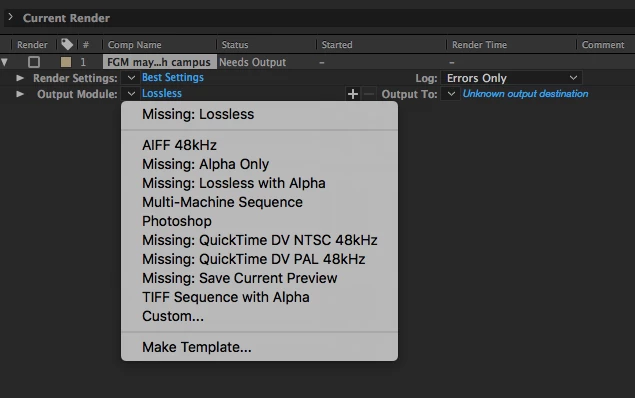
I have a full Creative Cloud license CC 2017. I just installed After Effects and now I need to render my sequence but there are no (video) output options available. what to do? Here is a screenshot.

I tried exporting to Media Encoder but this also is not working.
    This topic has been closed for replies.

    4 replies

    Participant
    October 15, 2019

    Has anyone found a solution to this yet? I've just come across it and I've found nothing either

    Kevin J. Monahan Jr.
    Legend
    July 24, 2017

    Hi Advaitji,

    See if this post assists you: Re: Message: Template...Missing Output Plug-in

    Let us know what happens and if you need more help.

    Thanks,
    Kevin

    Kevin Monahan - Sr. Community and Engagement Strategist – Adobe Pro Video and Audio
    Nexahs1138
    Inspiring
    June 6, 2017

    You're missing a lot of stuff there, I'm guessing you're on mac? Unusual that QT isn't there. You don't seem to have your comp ticked, the grey box next to the comp name, you need that ticked if you want it to render.

    What happens when you send to ME? Are you going by composition > add to AME?

    ME is a better renderer as the standard one in AE

    Advaitji
    AdvaitjiAuthor
    Participant
    June 7, 2017

    Well it's taken some time to get this far - lots of restarts and installs/uninstalls/reinstalls and now at least AE and AME are both up and running at the same time. Problem was when one program was open the other took about 15mins to open then locked up. I noticed in the memory allocation preferences that both programs have all the RAM allocated. So i reduced them both and programs and me are happier. (I would assume that this was all taken care of by Adobe during install but obviously not - and i'm a graphics guy, not a programmer, I'm supposed to be making a video not rewiring a computer!)

    But still no rendered video!

    Export of my sequence to AME either using 'Export' command or composition>add to AME does.....wait for it......wait for it....just a few more seconds to wait.....nothing!

    Interesting fact: from AME I can export to all formats - at least that's working - pity i can't yet export direct from AE...

    Advaitji
    AdvaitjiAuthor
    Participant
    June 7, 2017

    just drag n' dropped compositon from AE onto AME render que. Crash! (AME not AE).

    FinalCut now open too - working fine - quicktime - everything as it should be!

    Come on adobe  - why can't i work with AE - this is totally frustrating!

    Dave_LaRonde
    Inspiring
    June 6, 2017

    What do you see under the "Make Template" selection?

    I realize you shouldn't have to do that, but you might be able to build one, get the job done and troubleshoot afterwards.

    Advaitji
    AdvaitjiAuthor
    Participant
    June 6, 2017

    Pretty much the same; image sequences (&audio) are the only options available. I realise i can export to one of these formats then convert to video but it's a long way around!