


Participant
Sep 8, 2025 8:05 PM UTC
Answered

Mocha AE - no QT platform plugin could be initialized

Help, I cannot start Mocha Ae all of a sudden, and every time I try, I get this message. Immediately after hitting OK, Ae crashes. 

Error message:
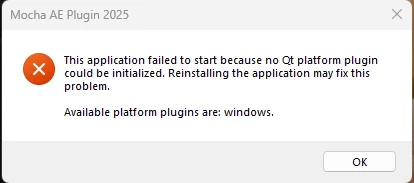
I have reinstalled, after effects and removed plugins. I did the same for premiere pro for good measure. I tried switching to open cl from cuda, I tried not using hardware at all. I tried installing a trial of MochaPro and that works. I did run in command prompt: sf/scan now. That didn't resolve the issue. I have no way of only reinstalling MochaAE as it is bundled with Ae. I cannot even open Mocha Ae to clear the cache, I cannot find instructions as to where the cache is online to manually clear it. 
SYSTEM:
MSI Raider GE78 HX 13V
Processor 13th Gen Intel(R) Core(TM) i9-13950HX (2.20 GHz)
Installed RAM 64.0 GB (63.7 GB usable)
NVIDIA GeForce  RTX 4080 Laptop GPU
System type 64-bit operating system, x64-based processor


stregobor
stregoborCorrect answer
Participant
Oct 7, 2025 8:35 PM UTC

Hi, I have tried reinstalling.
I just tried using the cleaner tool, and removed everything, restarted, and tried to use mocha ae, only for the qt platform failure message to pop up again. Not sure what to do here.


program files > adobe > and there was a folder "Common" > change the name of the folder to "Common.old"

Then restart adobe after effects > Run as administrator > It should work

7 replies

Kevin J. Monahan Jr.
Legend
Sep 8, 2025 10:18 PM UTC

Hi there,

Thanks for the question and welcome to our community. I heard that you are having trouble with Mocha AE. I have asked the product team to respond here. I have to ask for your patience while we await a response. Sorry for the frustration. 


Thanks,
Kevin


Translate
Kevin Monahan - Sr. Community and Engagement Strategist – Adobe Pro Video and Audio
elohimp1Author
Participant
Oct 3, 2025 7:17 PM UTC

Hi there,

Just wondering if anyone can help with this?

Translate
nishu_kush
Legend
Oct 6, 2025 8:48 PM UTC

Sorry for the delayed response.

Have you tried reinstalling After Effects? If it didn't help, try uninstalling it using the Adobe Cleaner tool and reinstalling. The cleaner tool ensures the removal of all the residue files.

Let us know how it goes.


Thanks,
Nishu

Translate