
Participating Frequently
July 3, 2023
Question

Mogrt coding

  • July 3, 2023
  • 3 replies
  • 571 views

Im trying to make a mogrt template but having problem because of the font that I'm using. When im using the font meta pro, the base line of the numbers are off, it will only be aligned if i Allcaps it.  
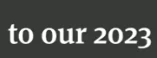
is there a way to write a script on it that it will detect numbers inside the text box and it will automatically Allcaps the numbers so that the baseline will align?


Thanks

This topic has been closed for replies.

3 replies

Inspiring
July 5, 2023

I ran into this very same problem some months ago (approved design uses a font that has old style figures when All Caps isn't enabled, but lining figures were what was approved for the design) and ended up having to go with a solution that isn't generalizable, so I decided to take this on again as a challenge. Here is a project file demonstrating a method that should get you the result you are looking for as long as you can observe a few constraints. This method uses multiple copies of the text layer which are parented to each other and linked with expressions, so you will need to make sure each copy maintains the same font and paragraph settings. You also likely won't want to try to use any text animators on this (or if you do you'll need to do so in a way that they are synced on both visible text layers and that the animators don't interfere with the animators that make this method work). Regular layer transforms should be fine, though.


Also this method counts on the character width and built-in kerning for the old style figures being the same as for the lining charaters. If they aren't things might look funny.


Anyway, check it out, and if you have questions or comments let me know.

Community Expert
July 3, 2023

You will have to use two text layers and tie the position of the layers with the numbers to the position of the text. If you have text following numbers, you will need a third layer. 


The simplest option would be to look for a very similar font that does not stylize the baseline of certain numbers. Unfortunately, sourceRectAttime() has no option for baseline. You can use Top to compensate for any baseline shift, but there is no compensation for ascenders or defenders in a font design. 

Participating Frequently
July 3, 2023

@Rick Gerard , what about using {fontSize} in place of getting the sourceRectAtTime height? Is there a method of calulcating using that style property? I've used a method for standardizing anchor points before with this expression: 

//Center
var layer = thisLayer;
var {width, left} = layer.sourceRectAtTime();
var {fontSize} = layer.text.sourceText.style;
var xHeight = fontSize / 2;
var topLeft = [left, -xHeight];
var height = xHeight;
thisLayer.add(topLeft, [width / 2, height / 2]);

 Would this be something we can use for scale as well?

Community Expert
July 3, 2023

Font Size is not going to compensate for different ascender and descender sizes. Fonts are designed to fit in a box. The height of the box is the point height for the font. The box width is constant for monospaced fonts but based on a percentage of the artwork for most fonts. The designer can fill the box with any size content they want, so things like the bottom part of the 3 in your example, which descends below the baseline, can be any size they want.  


Using the font size will only help you line up the baseline. Defining a maximum height and then using that as a scale multiplier for scale would allow you to define a text box's maximum width, then put together an if/else scenario that would scale down the font layer so so that it would always fit inside the box. It would be the same as using sourceRectAtTime(), based on the font size instead of the text layer's height. Those two numbers will be different because not all fonts fill the same percentage of the design frame.


That still is not going to reposition the layers with descenders like your sample 3, and because you can't set a formatting option like all caps by expressions or text animators, you are still stuck with multiple text layers if you only want part of the line to be in all caps. 

Mylenium
Legend
July 3, 2023

That's not possible, anyway, since the setStyle() expressions will always change the whole text, not just a part, so you're wasting your time looking for something that doesn't exist. Split up the layers and format them separately.


Mylenium