

Austin James Piedra
Known Participant
November 27, 2020
Answered

MOGRT Created in After Effects Crashes Premiere

  • November 27, 2020
  • 5 replies
  • 2302 views

I have built quite a few motion graphics templates and have never encountered this problem before. I created a text box graphic in After Effects 17.5.1 with some fairly standard transform controls and color adjustments, but for whatever reason, importing the graphic into Premiere 14.6.0 causes the program to crash every time after loading the graphic to 89%. 


I've done everything I can think of in trouble shooting this issue. At first I duplicated the composition and added it to the essential graphics library from there, didn't work. Then I built the graphic entirely from scratch in another new composition in the same project, same issue. Then I created a new After Effects project just for this mogrt, built it from scratch, and still it loaded to 89% and then crashed Premiere. In each of these iterations, the mogrt works completely fine in the After Effects Essential Graphics panel, and continues to work fine when reopening the file after Premiere crashes. I have already tried uninstalling and reinstalling both After Effects and Premiere, but that didn't solve the problem. I have also tried installing different NVIDIA drivers, but that didn't work either. Everyone of my coworkers who has tried to use this mogrt file from the synced Essential Graphics Library encounters the same issue, both on Mac and Windows computers.


What's even more confusing to me is that I have been able to make other mogrt files in the time since starting this project, all using the same types of code (if/then drop down menu stuff, linking parameters with the pickwhip, checkboxes, that sort of thing) and all of them have worked just fine. Even other mogrt files from different compositions in the original After Effects file work fine, it's just this text box comprised of six shape layers, two text layers, and three null objects. 


I've wondered if it perhaps is an incompatible effect issue?  All in all, I'm only using:

• Slider Control (3 instances)

• Dropdown Menu (1 instance)

• Checkbox Control (2 instances)

• Set Matte (5 instances)

• Tint (13 instances)
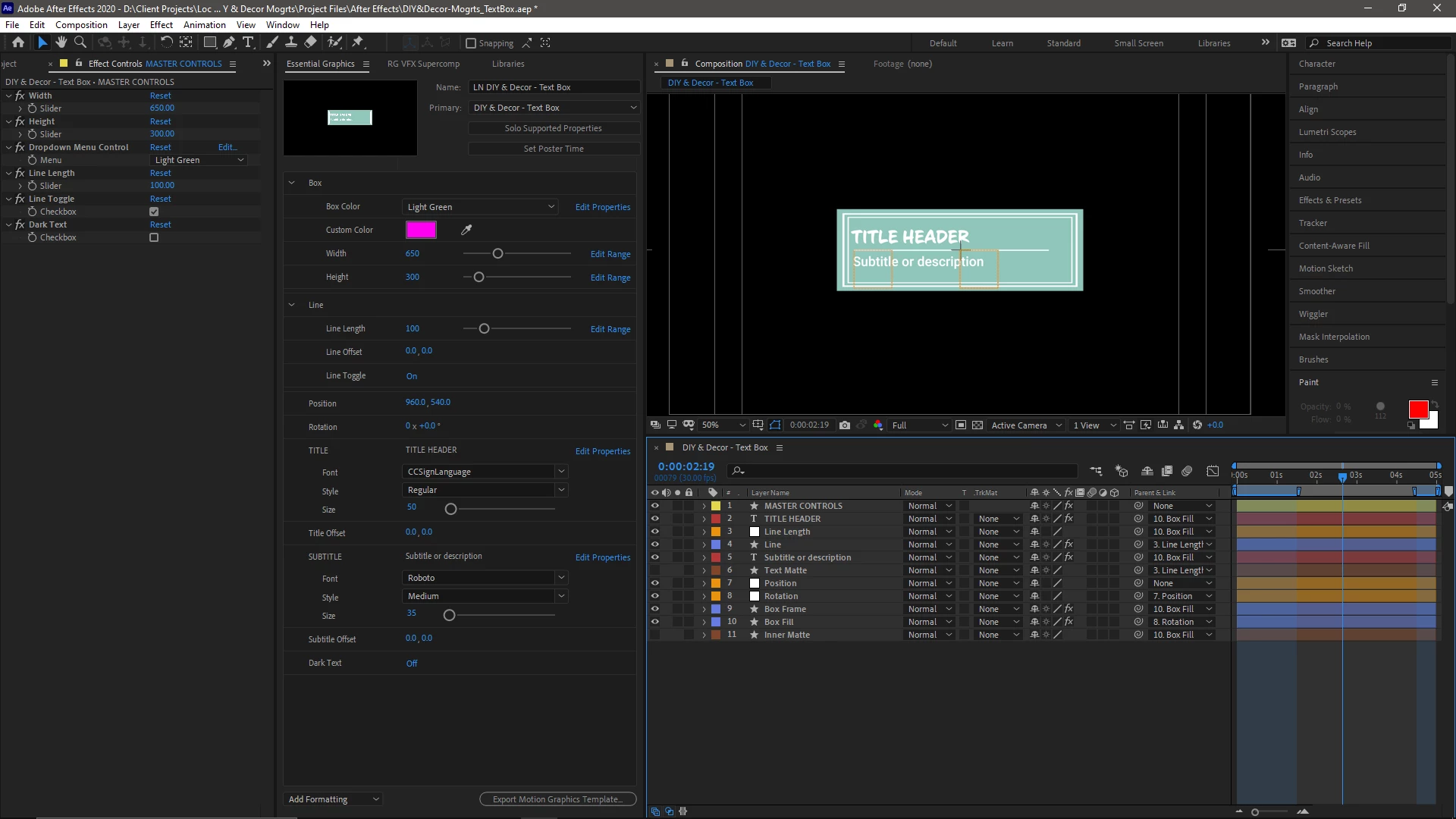


My system specs are:

OS - Windows 10 Pro v1909

CPU - AMD Ryzen 7 2700x

GPU - GTX 1070ti

RAM - 32GBs


If anyone has any idea as to what could possibly be the problem here, please reach out. This has created a major obstacle for my team and I who are reliant on this graphics package to finish out projects.


Thanks, 

This topic has been closed for replies.
Correct answer DaciaSaenz

Ok! 

Hi @Austin James Piedra,

Thanks so much for sharing your Mogrt. The issue seems to be a bug with Anchor Point controls added to the EGP from Solids, Nulls, and Adjustment Layers. 😞 


Still learning more about the issue, but removing the Line Offset control makes the Mogrt work in Premiere. But you NEED the Line Offset Control you say! I added a 2D-Point Control to your Master Control layer and pickwhipped the Line Offset Anchor Point parameter to that control, which I then added to the EGP and voila! 

No crash in Premiere! 

I will update the channel when the fix is in, but in the meantime the 2D Point Control workaround should get you back in business. 

Thanks for sharing this Mogrt! 
We had been trying to hunt down the root of this crash for a few weeks and had not been able to isolate this issue. 

Cheers,

Dacia

5 replies

DaciaSaenz
DaciaSaenzCorrect answer
Inspiring
December 1, 2020

Ok! 

Hi @Austin James Piedra,

Thanks so much for sharing your Mogrt. The issue seems to be a bug with Anchor Point controls added to the EGP from Solids, Nulls, and Adjustment Layers. 😞 


Still learning more about the issue, but removing the Line Offset control makes the Mogrt work in Premiere. But you NEED the Line Offset Control you say! I added a 2D-Point Control to your Master Control layer and pickwhipped the Line Offset Anchor Point parameter to that control, which I then added to the EGP and voila! 

No crash in Premiere! 

I will update the channel when the fix is in, but in the meantime the 2D Point Control workaround should get you back in business. 

Thanks for sharing this Mogrt! 
We had been trying to hunt down the root of this crash for a few weeks and had not been able to isolate this issue. 

Cheers,

Dacia

- Dacia Saenz, AE & PR Engineering Teams
Austin James Piedra
Known Participant
December 7, 2020

Huzzah!


The Point Control work around seems to have done the trick. Thank you so much for working with me on this, my team can finally stop fiddling with trying to make other graphics work for them in Premiere.


Bests,

- Austin.

DaciaSaenz
Inspiring
December 8, 2020

YAY! Sorry for the inconvenience! 


The fix is available in Beta now in any build after 14.8 x 28

- Dacia Saenz, AE & PR Engineering Teams
Roland Kahlenberg
Legend
December 1, 2020

Have you tried (1) without font substitution (2) with a different, basic fonts as options for font substitution?

Very Advanced After Effects Training | Adaptive & Responsive Toolkits | Intelligent Design Assets (IDAs) | MoGraph Design System DEV
Austin James Piedra
Known Participant
December 1, 2020

I haven't tried that, but every one of my other mogrts from the same project also utilize font options without any issues, and if I had to disable them, I wouldn't be able to use the graphic for the projects it's needed in.

Roland Kahlenberg
Legend
December 1, 2020

My suggestions were meant to troubleshoot the issue, to find the precise cause. Everything seems to be standard stuff except for the fonts. Hence, that's the first variable I'd look into. HTH

Very Advanced After Effects Training | Adaptive & Responsive Toolkits | Intelligent Design Assets (IDAs) | MoGraph Design System DEV
DaciaSaenz
Inspiring
November 30, 2020

Hi @Austin James Piedra ,


That is a bummer! Can you please DM me the Mogrt so I can investigate further? 


Thanks in advance,

Dacia

- Dacia Saenz, AE & PR Engineering Teams
Austin James Piedra
Known Participant
November 30, 2020

Thanks Dacia,


I just sent you a DM with a link to the .Mogrt and the After Effects file that it came from.

Participant
November 30, 2020

Please help us, Mr. Adobe... or our boss might beat us again 😞

DaciaSaenz
Inspiring
November 30, 2020

OH NO!!! We can't let that happen! Send me the bad Mogrt stat! 

- Dacia Saenz, AE & PR Engineering Teams
Participant
November 30, 2020

Our team is facing major obstacles during a huge deadline. Please see what you can do. Thank you so much!