
Inspiring
March 26, 2022
Answered

MOGRT edited in AE Not Displaying 100% vertically in Premiere

  • March 26, 2022
  • 3 replies
  • 429 views
I downloaded a template from Envato "TECHNO SLIDESHOW DIGITAL INSPIRATION" that needed to first be opened in AE to import my media. Everything works fine in AE, I export it as a MOGRT and it's in my library when I open Premiere. As soon as I drag it onto my timeline, it only displays a sliver of the available screen space vertically. I'm no expert in either of these, but not a total newbie either. I am at my wit's end on how to fix this. Here's a screencap of what it looks like when I bring it into Premiere:
I've gone back into AE to try to see if there is a setting I missed. The instructions that came with this template don't say anything about settings, just replace the media and export - which is what I did.
Any help would be greatly appreciated. I need this project complete by tomorrow morning.
Thanks!
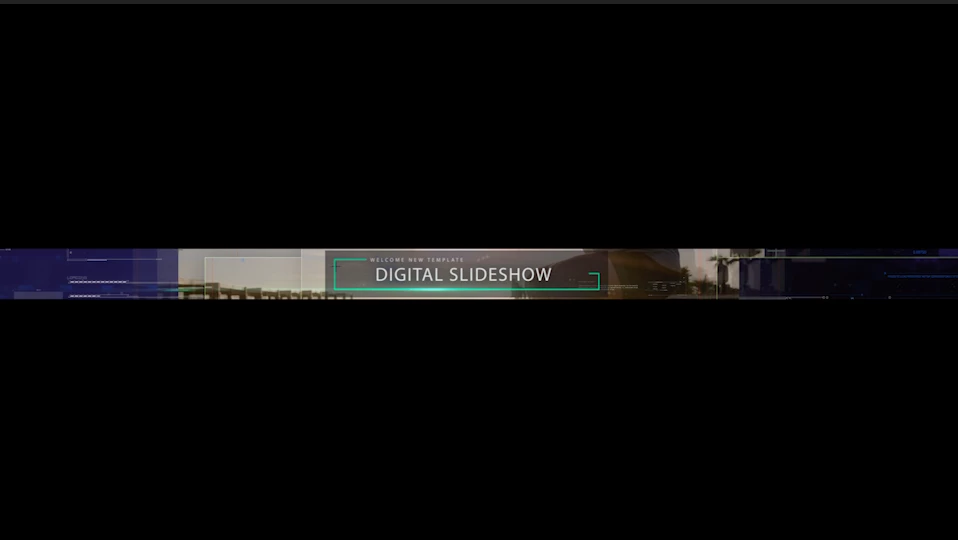
This topic has been closed for replies.
Correct answer Jon22524026lfu4

I figured it out. I just pulled the MOGRT into the timeline without sitting it on top of any footage. Once I put it on top of some footage, it was fine.

Thanks for the replies though, I sincerely appreciate it!

3 replies

Jon22524026lfu4AuthorCorrect answer
Inspiring
March 26, 2022

I figured it out. I just pulled the MOGRT into the timeline without sitting it on top of any footage. Once I put it on top of some footage, it was fine.

Thanks for the replies though, I sincerely appreciate it!

Roland Kahlenberg
Legend
March 27, 2022

Thanks for reporting back, Jon. Have a great day ahead.

Very Advanced After Effects Training | Adaptive & Responsive Toolkits | Intelligent Design Assets (IDAs) | MoGraph Design System DEV
Roland Kahlenberg
Legend
March 26, 2022

It looks like the size of the AE comp used to create the MoGRT is different to the size of the Sequence in PPro. Ensure they are the same or you'll have to do some Expression-ing to solve the issue in PPro. 
HTH 

Very Advanced After Effects Training | Adaptive & Responsive Toolkits | Intelligent Design Assets (IDAs) | MoGraph Design System DEV
Joost van der Hoeven
Community Expert
Community Expert
March 26, 2022

Can you please share your system info? Like OS and version, CPU, RAM, GPU vRAM, Ae version? Thanks. Also a screen grab of the comp settings in Ae and the sequence settings in Pr will be helpful.

FAQ: What information should I provide when asking a question on this forum?
https://community.adobe.com/t5/after-effects-discussions/faq-what-information-should-i-provide-when-asking-a-question-on-this-forum/m-p/3928960#M3238