


Participant
April 13, 2017
Answered

Motion blur rendering problem
  • April 13, 2017
  • 4 replies
  • 3585 views

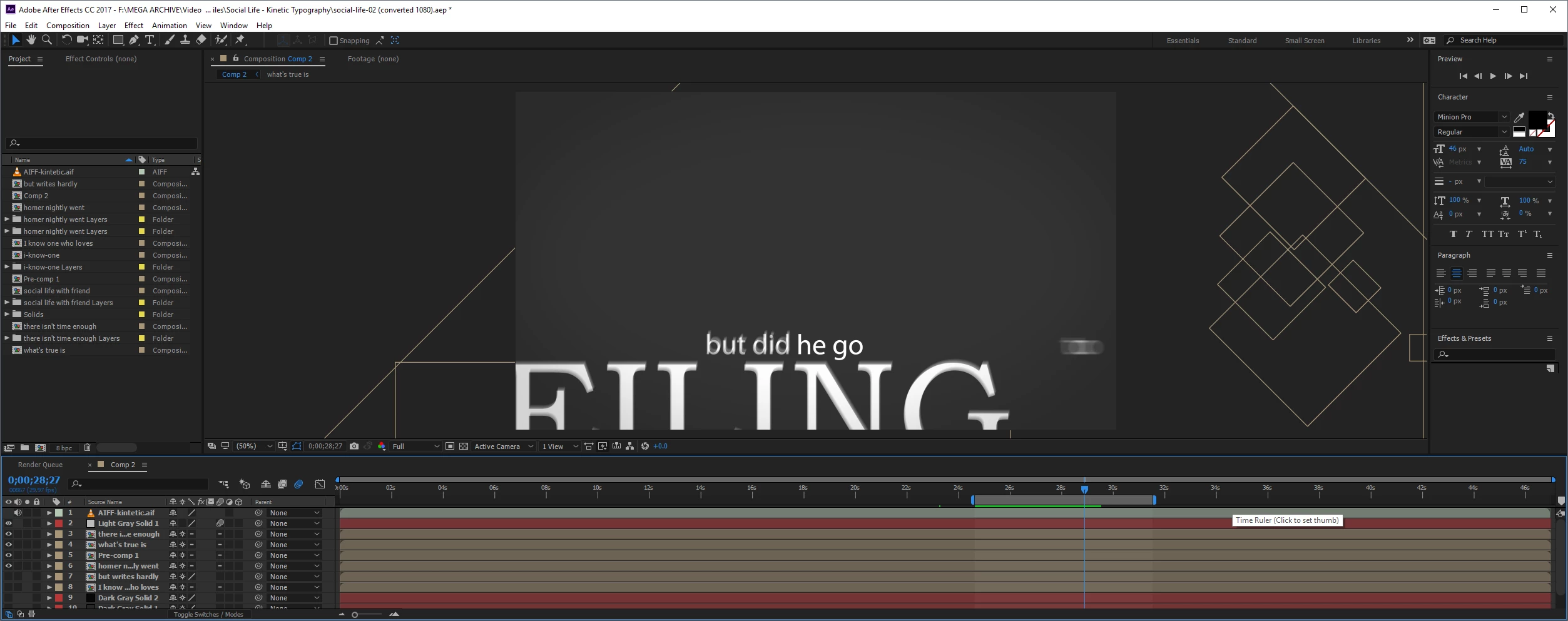
I'm having an issue with an old project I recently re-opened. I scaled the comp from 405 to 1080. Everything was vector so it scaled beautifully, BUT when I go to render, the motion blur is "sticking" on some words. In the screenshot above, see the "but did" before "he go"? The words flew on from off the screen and have stopped. They should no longer have any motion blur, but it's stuck there. When I purge the memory and cache, it updates and disappears, but as soon as I try to render again, it sticks again.

Any suggestions to force the motion blur to disappear as normal when the word stops moving? The rest of the words (in this sentence) are fine. This happens multiple times throughout the composition, so it's not just this one layer.
    Correct answer Roei Tzoref

    Apparently this bug is still here. Read here for workarounds: Motion blur effect doesn't stop after the comp stops moving...

    4 replies

    Participant
    March 4, 2024

    Similar issues with LRC

    Community Expert
    September 11, 2023

    Check the Shutter Phase in the Advanced tab of the Comp Settings. A standard shutter is 180º and -90º. That will closely match the motion blur of a film camera. You can set the angle and phase to anything you want, and Zooming in to the timeline all the way will show you where motion blur is calculated.

    Participant
    September 11, 2023

    If you've changed the comp aspect ratio. This also happens. So in my case I have made the original comp in 16:9 and duplicated one to be in 4:3 but it gave this motionblur bug. Changing the duplicated 4:3 comp back to 16:9 fixed it.

    Roei Tzoref
    Roei TzorefCorrect answer
    Legend
    April 13, 2017

    Apparently this bug is still here. Read here for workarounds: Motion blur effect doesn't stop after the comp stops moving...

    Participant
    April 13, 2017

    Thank you, purging after every 1 frame fixed it.