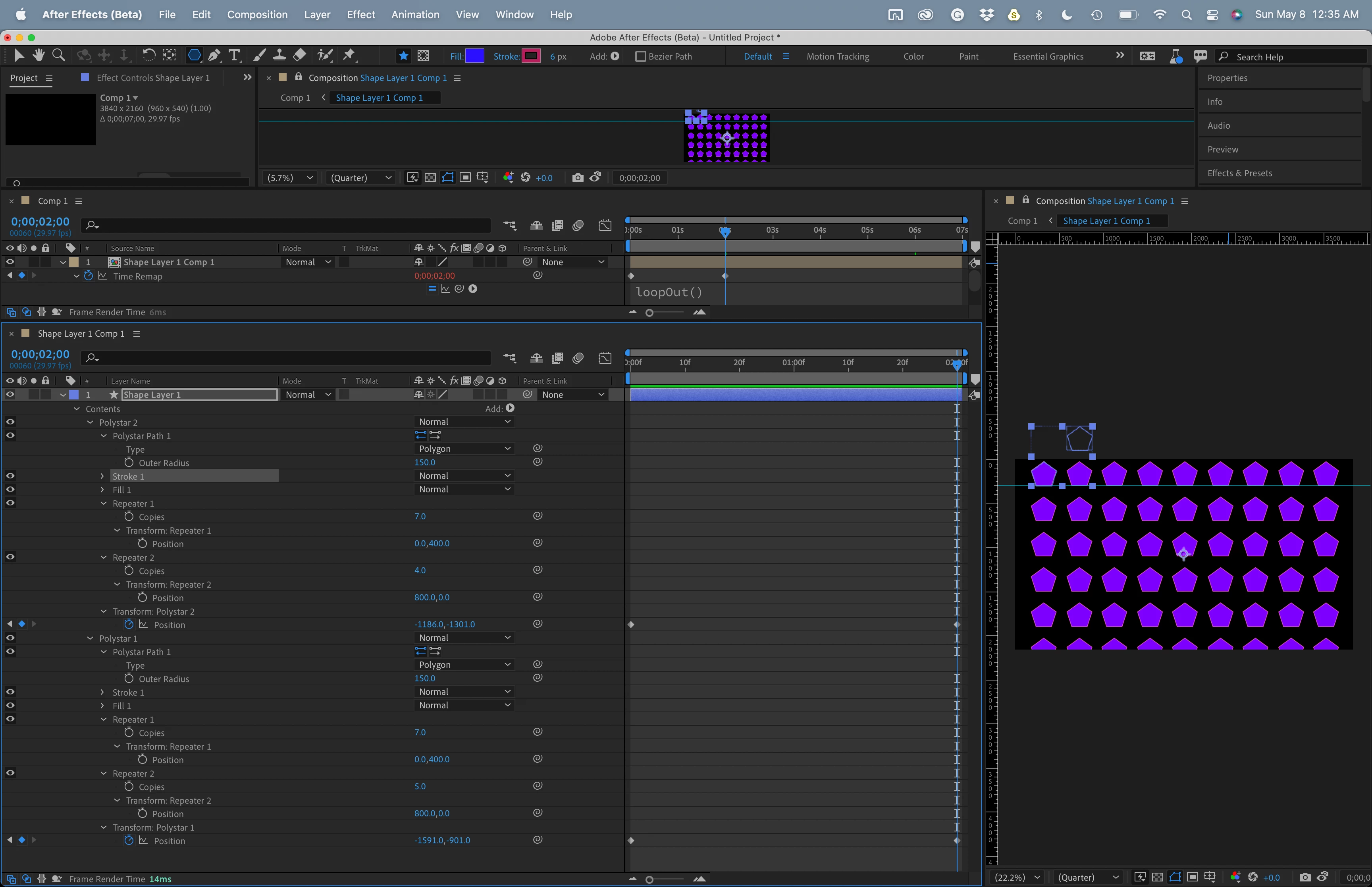
The trick I use to create this kind of animation is to build a very short comp that is just long enough for the graphics to move to the first place where they line up. In your sample video, it takes about two and a half seconds for a hart to move vertically from one horizontal line to another. I would create a comp that was two and a half seconds long, then animate a shape layer heart, then use a repeater to build a column of hearts, then add a second repeater to repeat the columns. I would leave a space for the column that would move in the opposite direction, then I would duplicate the column, offset it, and repeat the process. I could then animate each group so they move up and down until the positions overlap. I would then nest that short comp in a longer one, add time remapping, set a new time remapping keyframe on the last visible frame of the nested comp, delete the original last time remapping keyframe, and add a simple loopOut() expression to time remapping. As long as the first and last frames are identical, you'll get a seamless looping animation with two columns of graphics moving in opposite directions.
You can do the same thing by cutting up any layer with masks. Just find a repeating pattern. Motion tile quickly uses up resources, and you need two copies, but the same idea applies. Don't try and create the entire column, just find a spot where you have 2 identical frames and loop that in another comp using Time Remapping.
I made this sample comp in about 5 minutes. Maybe that will give you some ideas.

 AdChoices