
tilend94020061
Participant
July 11, 2019
Answered

Motion Tile & RepeTile problem with black borders

  • July 11, 2019
  • 4 replies
  • 6913 views

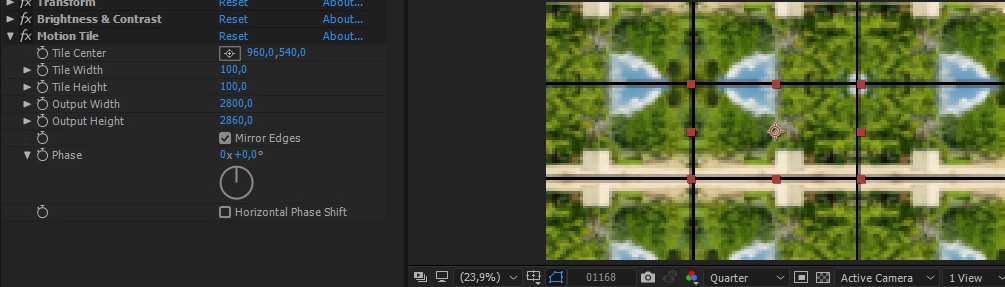
Hi, i have a problem with my timelapse. I applied Motion Tile effect and tried to make a rotation transition, but when i rotate the 100% scaled video, the black borders (edges) appear... I scaled out to make it obvious for you. How to get a rid of these black borders? The same problem appears when i apply RepeTile effect. Also with motion blur, it is still the same. Please help!

Thank you in advance,

Kind Regards
Correct answer Roland Kahlenberg

Try disabling the Transform Effect which has been applied, at the top of your Effects Control Panel.

Do you really require the Transform Effect?

4 replies

Known Participant
November 7, 2025

A little followup to this. Yes, I needed to have the Transform effect, and it had to be below RepeTile. For various reasons I couldn't precomp stuff. So I added a second instance of Repetile, and then another instance of Transform (scale) to correct for some weirdness. So the effect tree from the top down was RepeTile-> Transform-> Repetile-> Transform. Kludgy, but worked for what I needed it to do.


Participant
July 2, 2021

If you need the transfer effect, you should just move your motion tiles effect above the transfer effect. it will work.


liquidsaraforever
Participant
July 12, 2021

Yesssss! Changing the order of effects worked for me, thank you!

angie_taylor
Legend
July 12, 2019

Roland is right, it could be because of the Transform effect. What happens if you turn that off?

A workaround could be to Precompose the Transform effect and Brightness and Contrast with the layer. Then apply the Motion Tile effect to the resulting comp. To overcome the annoyance of having the Transform effect controls within the nested comp, add the Rotation property to the Essential Graphics panel (plus any other effect properties that you may want to control in the main comp). When you open the nested comp in the main comp, you should now be able to access the Transform effect controls in the Master Properties section of the Nested comp.

Roland Kahlenberg
Roland KahlenbergCorrect answer
Legend
July 12, 2019

Try disabling the Transform Effect which has been applied, at the top of your Effects Control Panel.

Do you really require the Transform Effect?

Very Advanced After Effects Training | Adaptive & Responsive Toolkits | Intelligent Design Assets (IDAs) | MoGraph Design System DEV
tilend94020061
Participant
July 12, 2019

Thank you!