Participating Frequently
December 2, 2016
Answered

Motion Tracker in AE CC 2017

  • December 2, 2016
  • 2 replies
  • 7834 views

My tracker panel doesn't have the actual buttons like the "track forward" triangle nor the "track backward" triangle.  How am I supposed to track my motion?  I have my points set and everything, I just don't have the option to track my footage.  Where did this go with the update?

    This topic has been closed for replies.
    Correct answer Roei Tzoref

    if I had to guess, this is another case of the faulty U.I design of stacked panels in Ae that is acting up. when you are with stacked panels, it can appear when the panel is not open wide, that there is no more features in that panel. this is not a new thing to CC2017, but ever since the stacked panels was introduced. in CC2017 it's can be even less apparent when your panel is not selected, that you really have more features in the panel.

    I guess this is what you see
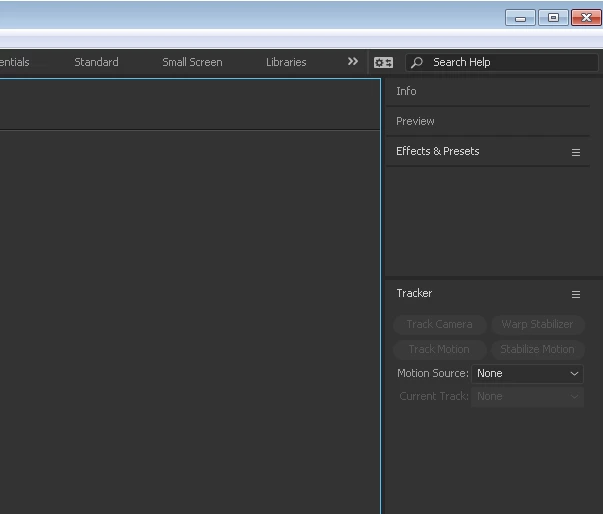
    where is the rest?

    click on the panel you will see it's boundaries
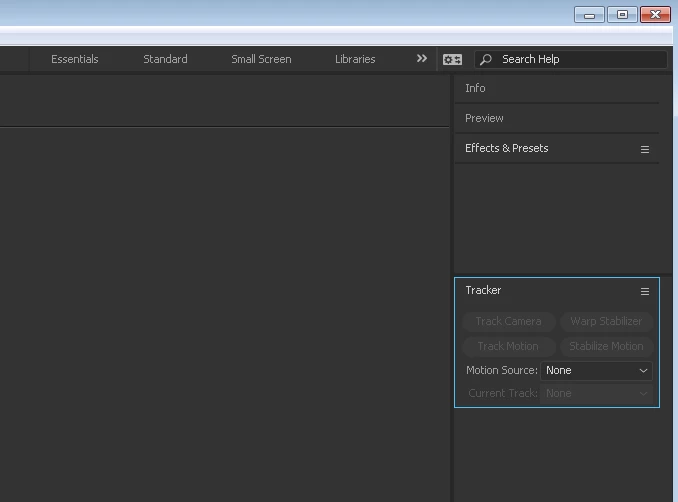
    you can now drag it down by clicking on the edges, holding and dragging down.

    there you go!

    if you don't want to work in stacked panel mode, you can use the standard workspace that defaults to tabbed panels: in the tools menu click window->workspace->standard. you may have to click "reset standard to saved layout".
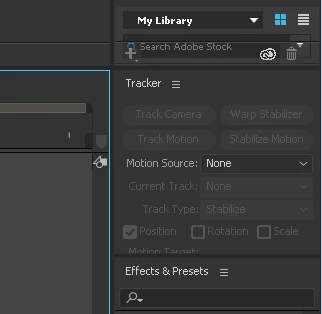
    now it's more visible where the borders are

    but if you want to work by the book, one can suggest that you should work in the motion tracking workspace.
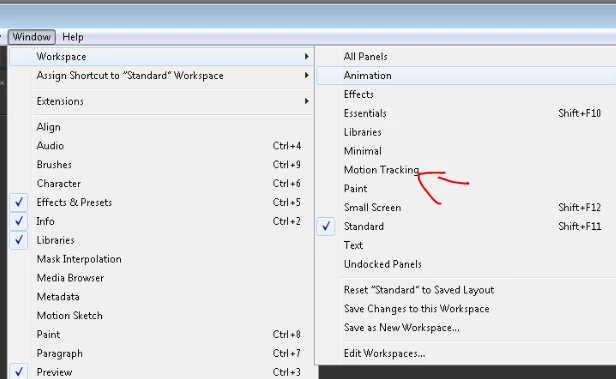
    personally I prefer the standard workspace and set my own panels when I need too.

    hope this was the case and I was not mumbling on a different topic entirely!

    2 replies

    Roei Tzoref
    Roei TzorefCorrect answer
    Legend
    December 2, 2016

    if I had to guess, this is another case of the faulty U.I design of stacked panels in Ae that is acting up. when you are with stacked panels, it can appear when the panel is not open wide, that there is no more features in that panel. this is not a new thing to CC2017, but ever since the stacked panels was introduced. in CC2017 it's can be even less apparent when your panel is not selected, that you really have more features in the panel.

    I guess this is what you see

    where is the rest?

    click on the panel you will see it's boundaries

    you can now drag it down by clicking on the edges, holding and dragging down.

    there you go!

    if you don't want to work in stacked panel mode, you can use the standard workspace that defaults to tabbed panels: in the tools menu click window->workspace->standard. you may have to click "reset standard to saved layout".

    now it's more visible where the borders are

    but if you want to work by the book, one can suggest that you should work in the motion tracking workspace.

    personally I prefer the standard workspace and set my own panels when I need too.

    hope this was the case and I was not mumbling on a different topic entirely!

    cgboltonAuthor
    Participating Frequently
    December 2, 2016

    Oh boy, yeah, this was it. Like a sane person, I though that undocking the panel would open up the bounding box.  Thank you for your help.

    Roei Tzoref
    Legend
    December 2, 2016

    in this case, the software was the insane one

    Community Expert
    December 2, 2016

    Select the motion tracking workspace. If the full panel is not visible expand the panel. They are there, just no visible in come workspace configurations on some systems. Nothing has changed.

    cgboltonAuthor
    Participating Frequently
    December 2, 2016

    No, that wasn't it.  I actually figured it out from another thread.  I thought it was just because the panel wasn't expanded, but I popped it out and expanded it and there literally weren't any settings underneath the "track motion button."  It wasn't until I reset to "all windows" that it came back.  Must be a bug. Thank you, though.

    Roei Tzoref
    Legend
    December 2, 2016

    if you popped it out like this:

    you still won't see it until you expand the borders inside