This topic has been closed for replies.

4 replies

Spamhunter
Inspiring
August 23, 2018

I have exactly the same problem (with just 2 Track points) but unfortunately I don't see the solution here. The 2nd one always seems to veer off any old where. I can only correct it frame by frame, which will take all day for a 30-second text animation.

Also, what is really frustrating is I can't seem to move the Feature window on its own without moving the Search window - and vice versa. And the anchors seem to be located on a single pixel which means I waste a lot of time just trying to locate & click on it. There are the two icons (small rectangle & cross) but both just move the entire 2 boxes instead of redimensioning either.

And the Attach Point is so tiny I can't see it most of the time, even when zoomed in (on my 4K monitor).

In the end, it's just much more practical to animate the tracked text independently without "Tracking".

Becomes:

!?

Community Expert
August 16, 2017

Did you look at the tutorials and help files?

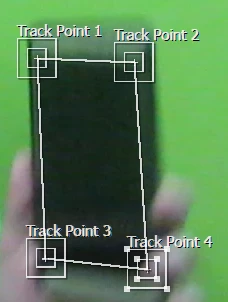
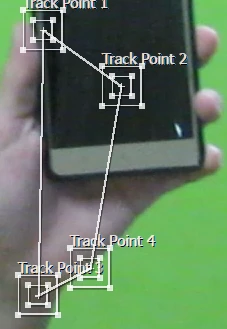
Do any of the corners move completely out of the search area between frames?

Did you try tracking one frame at a time?

I think Mocha  Corner pin tracing will work better for you but you will probably still have to do some of the work by hand. You'll never get it unless you run through the training materials.

If you still can't get it post your video to google drive or dropbox and I'll take a look.

Known Participant
August 16, 2017

I'll try it with mocha. I'll post the result here. Thanks for your help.

RemusBlueFX
Participating Frequently
August 19, 2017

Maybe give it another shot with AE tracker. Try to use the perspective corner pin and track only the position. See how's he's doing it here:

https://bluefx.net/advanced-perspective-corner-pin-tracking-after-effects

Roei Tzoref
Legend
August 16, 2017

Ae's perspective legacy tracker will only work if you have a very clear and dinstinct features to track. and even then, since the last decade you are better off using Mocha Ae (included with your Ae software) to track screens. Look for mocha screen replacement and learn how to do it.

Known Participant
August 16, 2017

I tried it with mocha, but still at some point it the tracking goes of the screen.

Community Expert
August 16, 2017

Try making your tracking area about twice as big and increase the search area. Search area has to be big enough to include all of the pixels in the inside box as they move to the next frame. If your two example frames are one frame apart then you are probably going to have to do some manual adjustments. If the motion is quick sometimes the easiest way to fix this is to just delete the tracking keyframes when the track fails, move to the next good frame and then adjust the trackers. I do it all the time with shots that have major production problems like sloppy camera movement or poor blocking.

Same thing in Mocha - include the entire phone + a little more in the spline, increase the percentage and turn on perspective.

Mylenium
Legend
August 16, 2017

Umm, well, your footage is extremely blurry and doesn't have any sharp features. This will never work using AE#s old 2D tracker. It might work in mochaAE, but even there you will probably have tp reposition the markers quite a lot. The shot has simply not been set up adequately and a very poor camera has been used to record it.

Mylenium

Known Participant
August 16, 2017

Trust me, its not blurry. The screenshot I took is blurry cuz that's the point where my phone appears in the shot and There is a lot of movement in there. The actual footage is good quality.