
Question
Moving from Adobe 2017 to 2018 errors
I have been having some issues moving from Adobe 2017 to 2018. For After Effects, I can open my 2017 project and it works fine. However, I can not save it.
When I first save a file, I receive this error.
After Effects error: chunk in file too big - probably unsupported file version. (33::7)
This error will only appear once and it will save the file but will not open. If I try I receive the error below. .
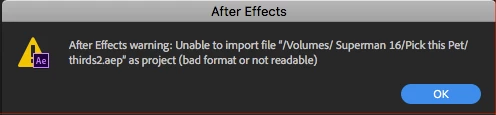
I have uninstalled and reinstalled After Effects. Cleared the Database and Cache.
Any help would be appreciated.
I am running Version 15.0.0 on a Apple Mac Pro
OS 10.13
32 GB RAM
 AdChoices