
Participant
December 23, 2021
Question

Moving multiple images across a path and preserving the formation?

  • December 23, 2021
  • 2 replies
  • 423 views

I'm trying to make this set of images move in the arrow directions shown below:
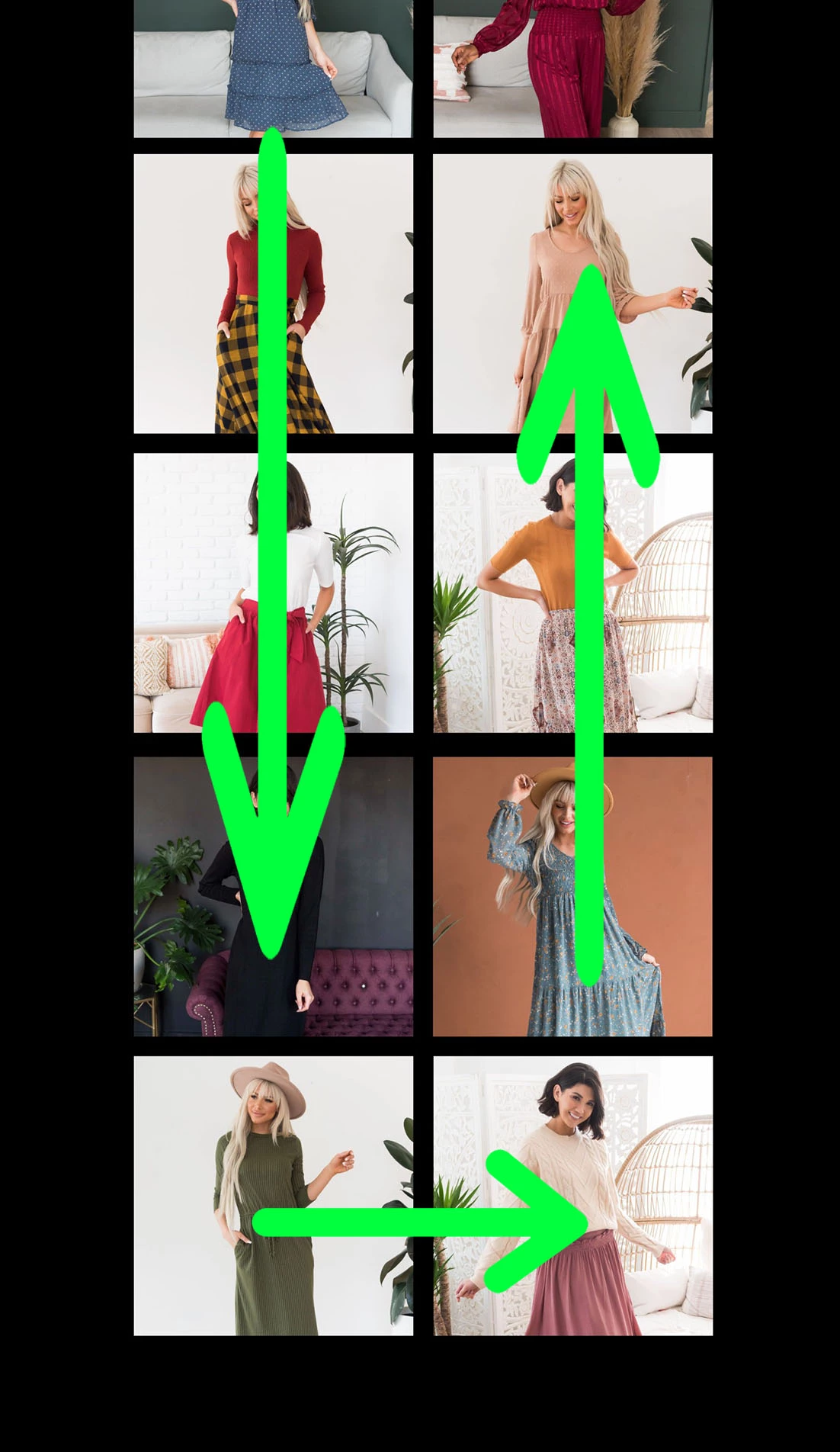
Creating a shape layer and copying the path to the positions of each image causes the formation to break.


I also noticed the shape path keyframes make it a linear movement. How could I make it stop-and-go like this?
This topic has been closed for replies.

2 replies

Mylenium
Legend
December 24, 2021

What Martin said. If it's a one time thing it takes three minutes to hand-animate. Otherwise it could be animated with a "grid push" expression similar to Dan Ebberts' classic:


http://www.motionscript.com/expressions-lab-ae65/random-grid-movement.html


It would just need some reworking to be non-random and produce your kind of circular motion.


Mylenium

Mrtn Ritter
Participating Frequently
December 23, 2021

If you have to do it once, you can animate this by hand. If you have to do it often or for a large amount of images, an expression will be worth the development time.


To animate this by hand, you start by creating the grid like in your screenshot. Next you take the image with the longest route to travel. Since you have aligned all other images, you already got all coordinates of the travel. Just open position property of all the others images and use those values.

To make a short stop and go, you can apply easy ease to the keyframe, switch to the motion editor and change the ease in a way, the image will stop for a short time. With the plugin Flow (https://aescripts.com/flow/), this is way more intuitve. For a longer stop and go, just copy/paste the keyframe a bit further in time. If the keyframe is already eased, make sure to ease-hold and hold-ease them, otherwise you'll have motion during the stop.

Now you have one cycle, or one travel. You can copy/paste the keyframes to the other images and just move them in time, so they don't overlap and stay in sync. All those keyframes will line up in a pattern, when everything is right.

In the last step, just delete all the keyframe which are not needed and enlarge the image layers in time, so they fill out the comp from start to beginning.


*Martin